Email Retention Policy Template for Enterprises (2026)
Enterprise email retention policy template that passes audit. Includes retention schedules, legal hold procedures, and technical enforcement.

Email is where your company makes decisions, commits to contracts, and stores years of institutional knowledge. It's also where lawsuits start, data breaches happen, and regulatory penalties add up.
If you keep everything forever, you're sitting on a liability time bomb. If you delete too aggressively, you create compliance failures and spoliation risk. The solution isn't asking employees to "clean up their inbox." The solution is a real retention policy with technical enforcement and a legal hold process.
This guide gives you a production-ready enterprise email retention policy template that's ready to customize and deploy, a starter retention schedule you can adapt to your industry, configuration guidance for Google Workspace (Vault) and Microsoft 365 (Purview), a legal hold playbook that actually works, and real-world edge cases and implementation patterns.
Not legal advice, but it's the closest thing to an auditor-grade starting point you'll find anywhere.
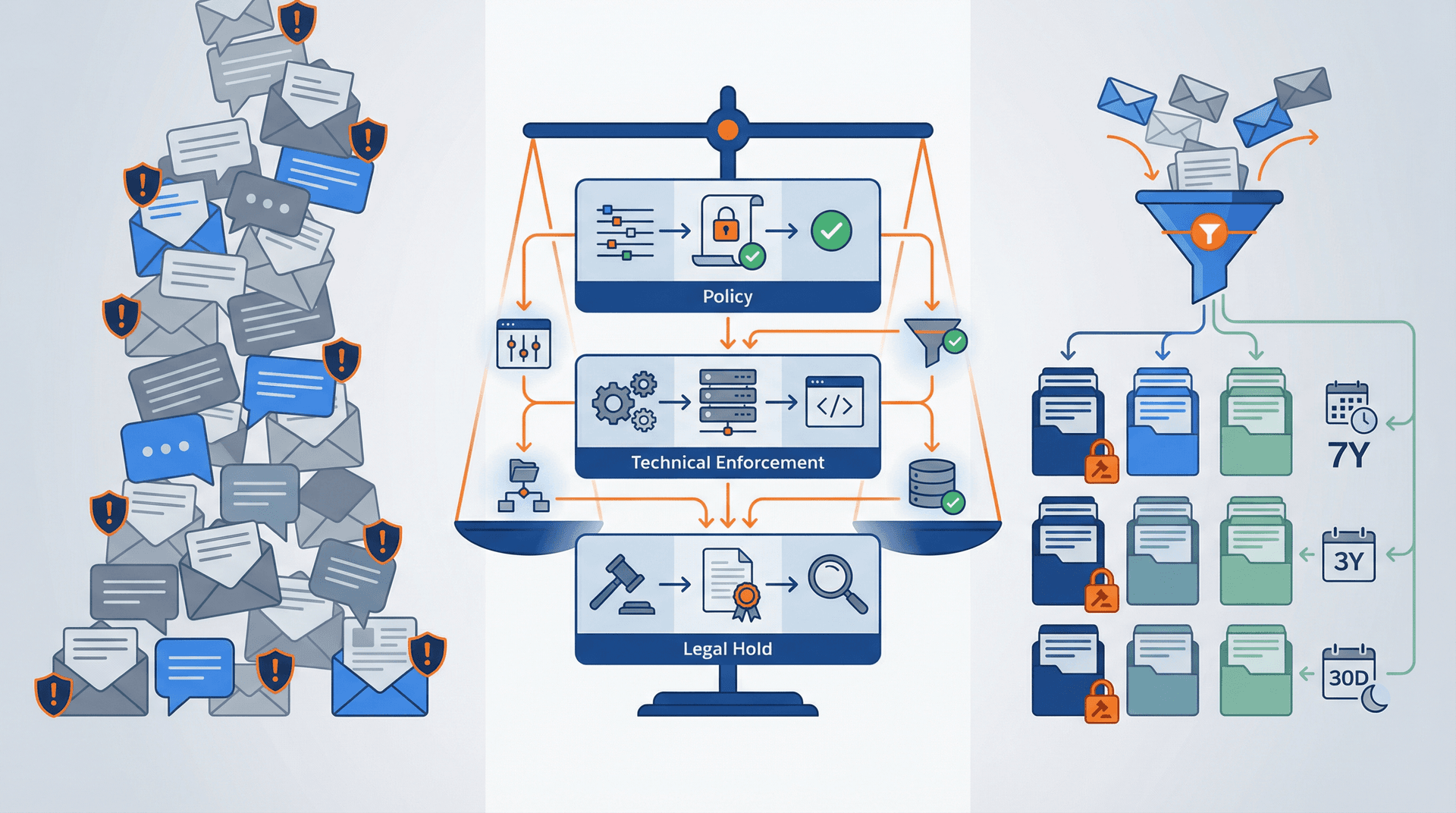
Why You Need an Enterprise Email Retention Policy
You're not here to learn what "retention" means. You need to ship a policy that will pass audit without collapsing under basic questions, pick retention periods without making things up or copying random templates, enforce it technically so it's not just a PDF collecting dust, have a legal hold procedure that's real (not ceremonial), and reduce risk across breach exposure, litigation costs, and regulatory penalties without killing productivity.
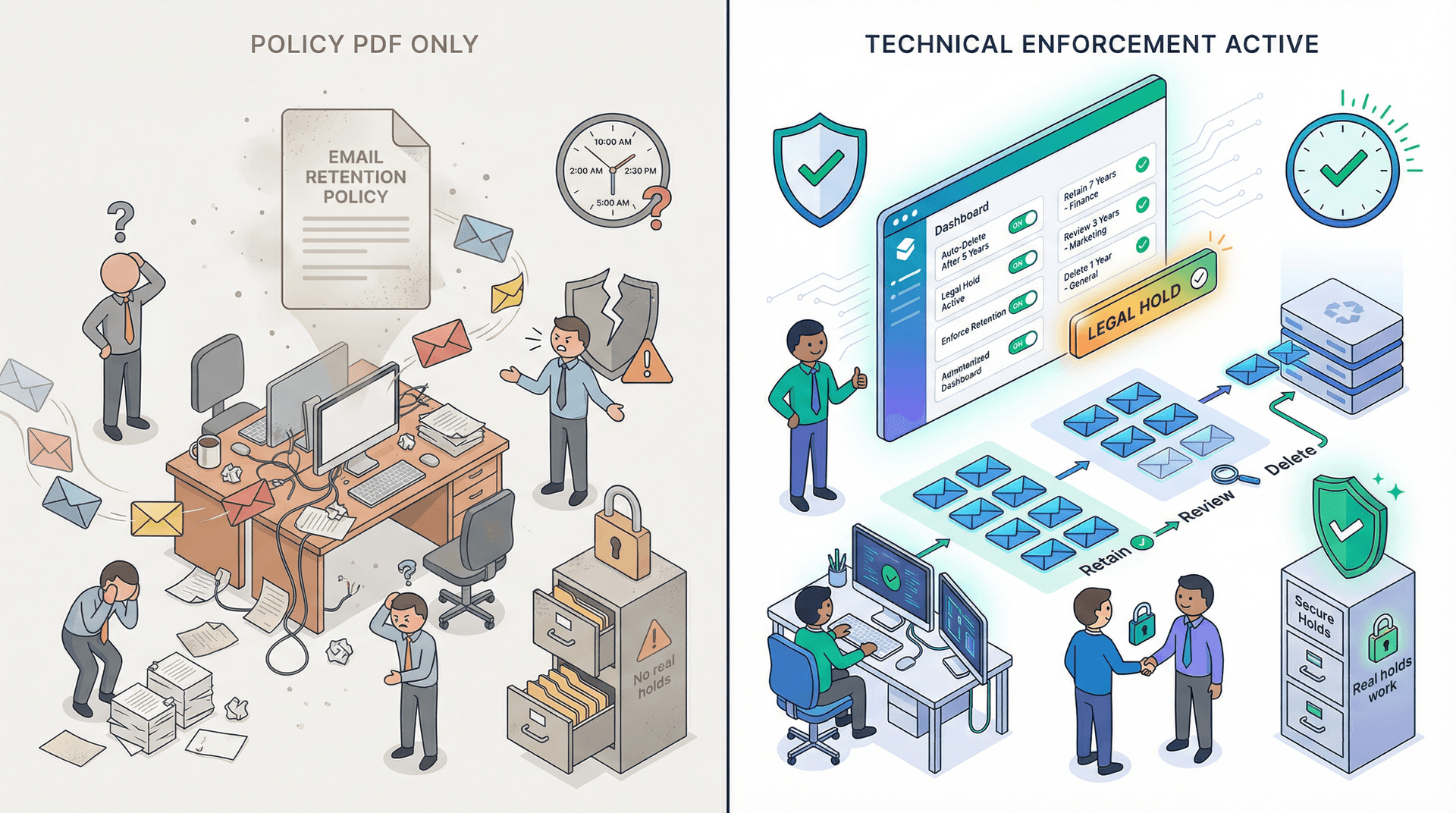
Success looks like this: retention rules exist in your admin console (not just policy documents), legal can place a hold in minutes, deletion is consistent and provable, employees understand what "record email" means, and exceptions are controlled instead of chaos. A proper email management strategy combines policy enforcement with practical workflows that employees can actually follow.
How Email Retention Works: Classification and Enforcement
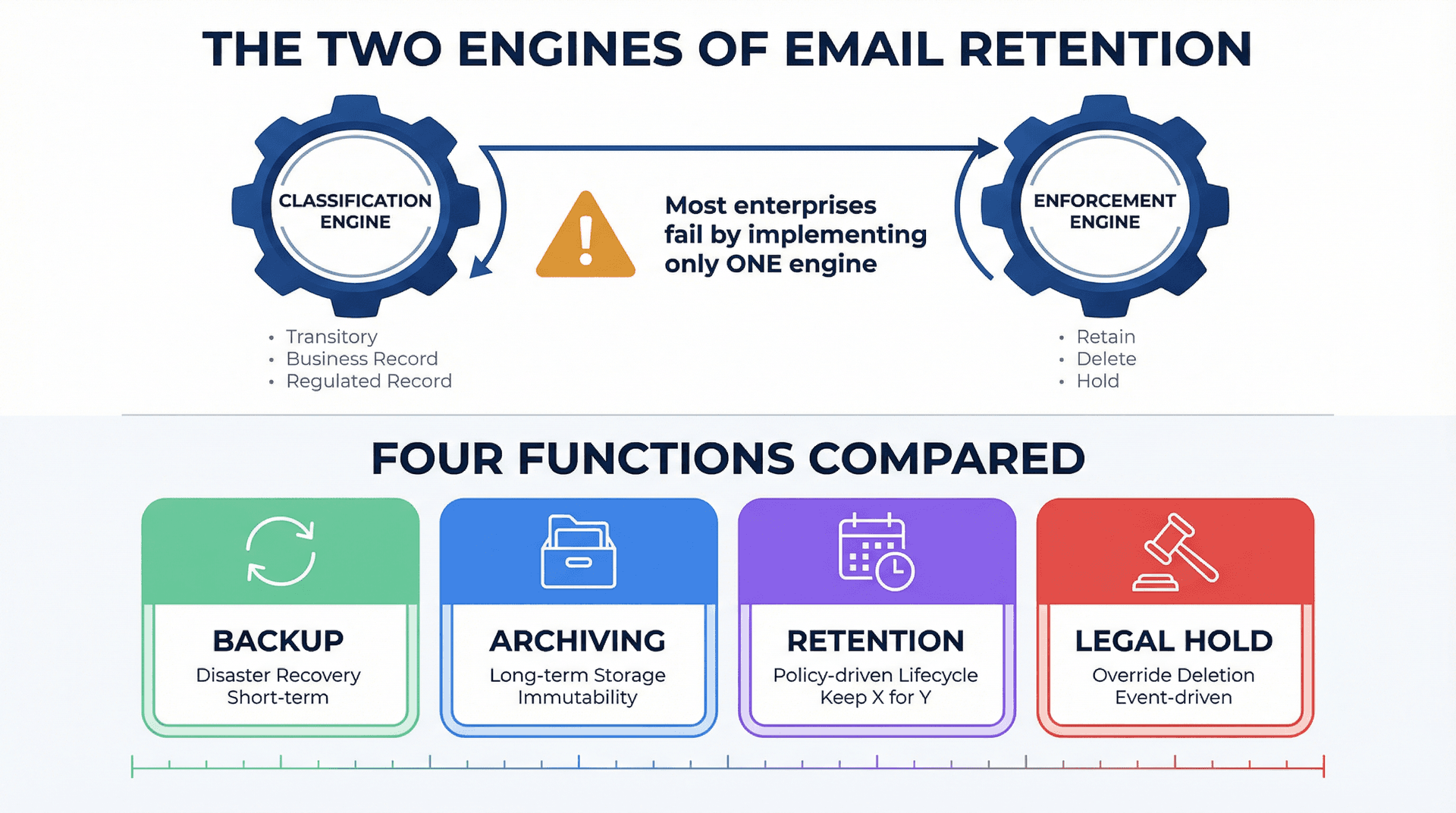
The Two Engines of Email Retention
Every retention program runs on two engines. Classification is deciding what an email is (transitory vs business record vs regulated record). Enforcement is ensuring the right thing happens over time (retain, delete, hold). Most enterprises fail because they only do one. They write a beautiful policy (classification) but don't enforce it. Or they set blanket retention (enforcement) but don't align it to record types (classification).
Understanding the inbox zero method can help teams think more systematically about email classification (what needs action, what's a record, and what's transitory).
Email Retention vs Backup vs Archiving: What's the Difference?
| Function | Purpose | Focus | Lifecycle |
|---|---|---|---|
| Backup | Disaster recovery | "We lost mailboxes, restore from yesterday" | Short-term recovery |
| Archiving | Storage and immutability | Long-term search and preservation | Long-term storage |
| Retention | Lifecycle rules | "Keep X for Y period, then delete, unless hold" | Policy-driven lifecycle |
| Legal hold | Override deletion | "Stop deletion because litigation or investigation exists" | Event-driven override |
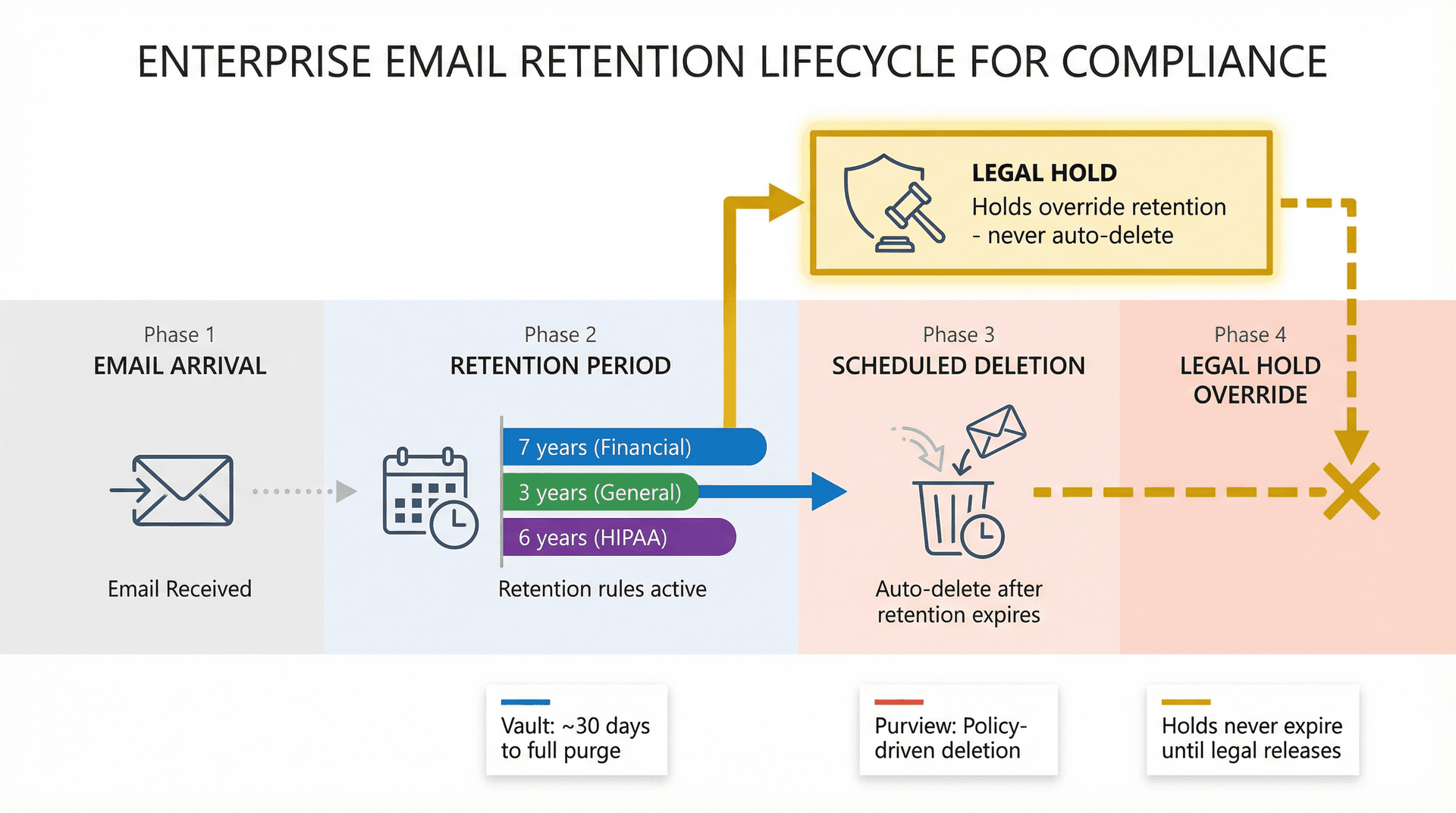
Both Google Vault and Microsoft Purview put this retention-hold split explicitly in their systems. Vault describes retention rules vs holds where holds never expire and override purge.
What Auditors Look for in Email Retention Policies
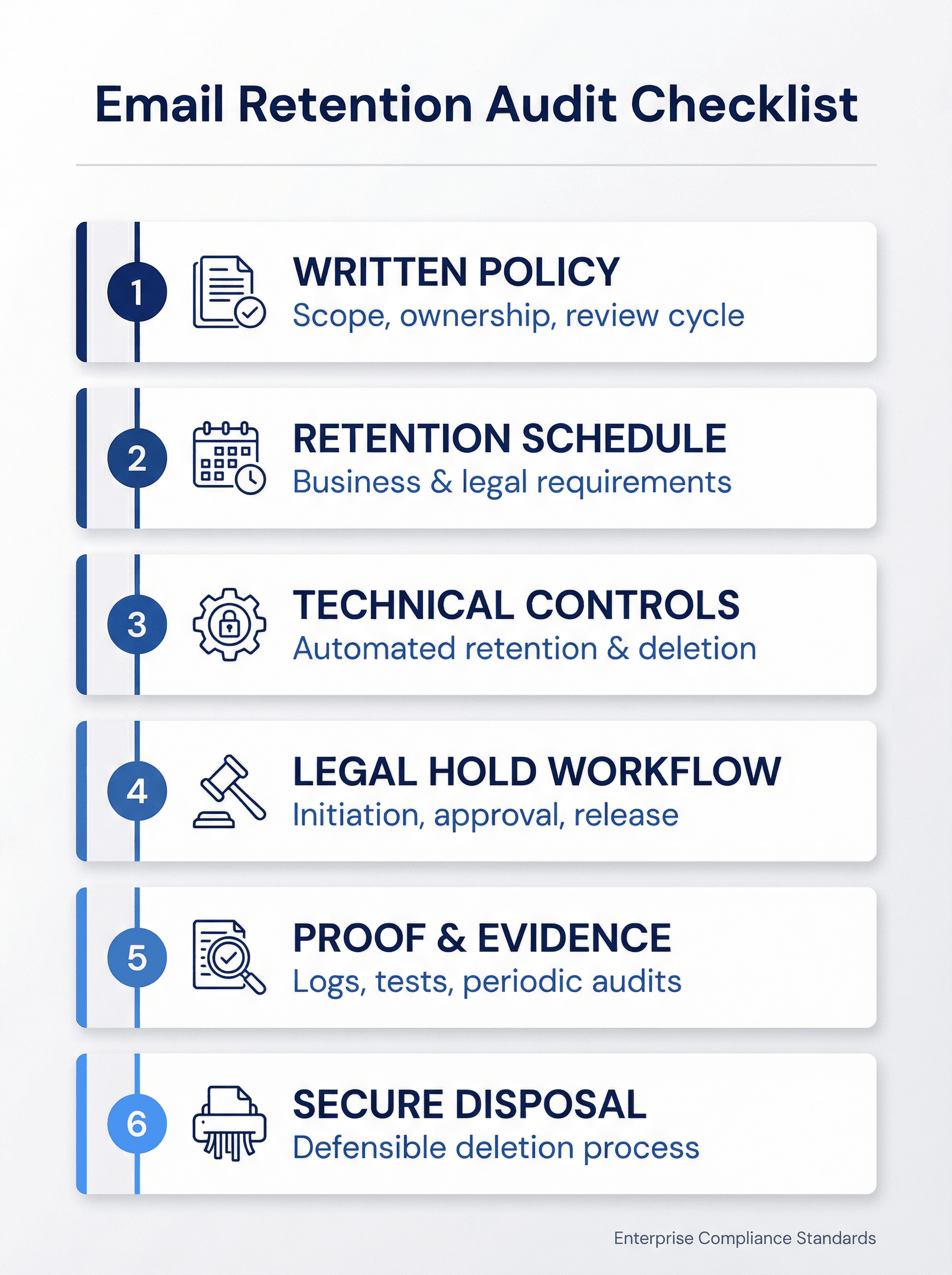
When auditors or regulators review your email retention program, they're checking for six things. First, a written policy with clear scope, ownership, and review cycle. Second, a retention schedule tied to actual business and legal requirements. Third, technical controls that actually retain and delete content, not just guidelines. Fourth, a legal hold workflow documented with who initiates, who approves, and how it's lifted. Fifth, proof through logs, test results, and periodic audits. And sixth, secure disposal that's defensible (deletion isn't just "trash emptied").
Email Retention Requirements by Industry and Jurisdiction
You'll tailor by industry and jurisdiction, but these are useful anchors.
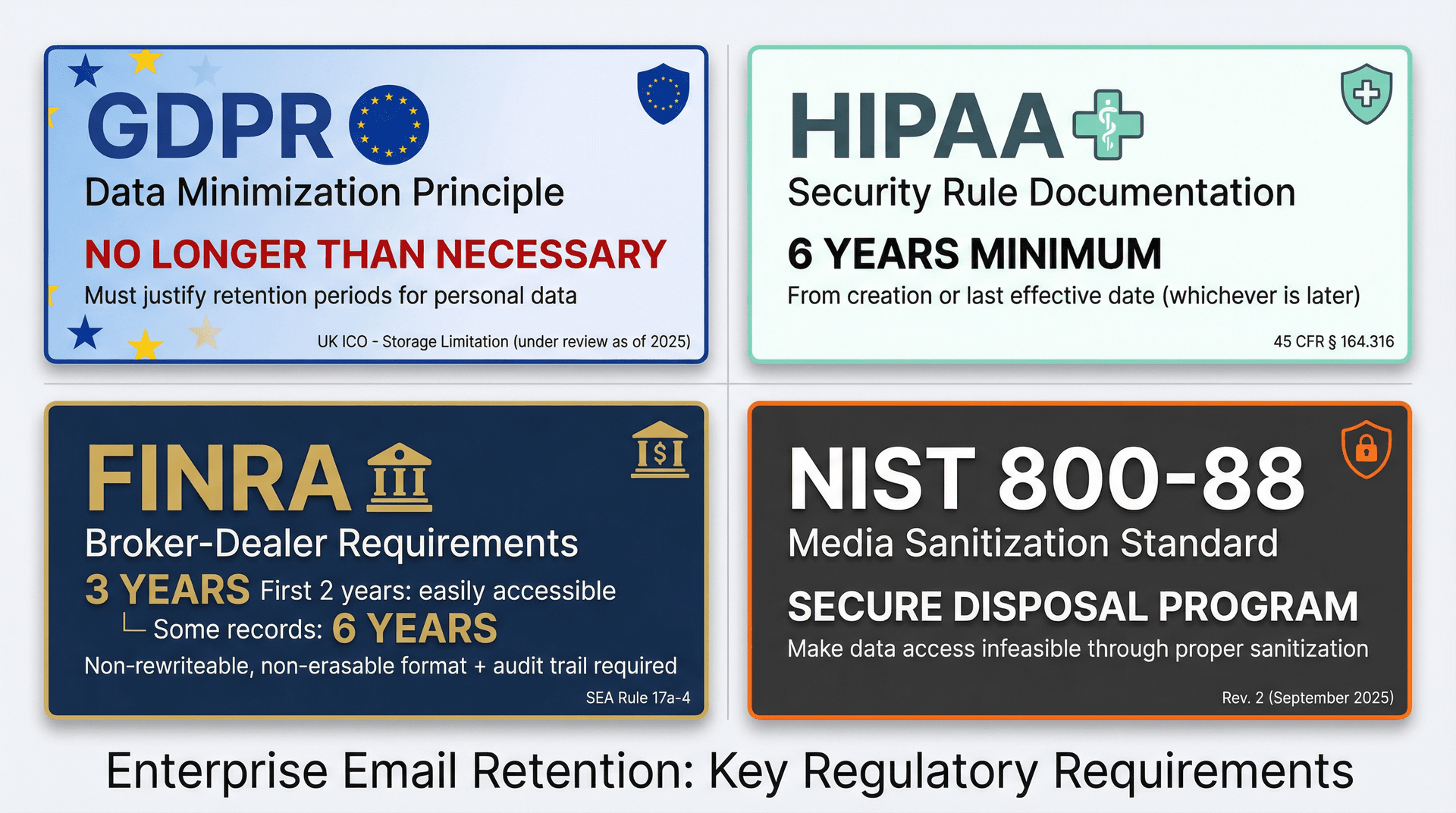
GDPR Email Retention: Don't Keep Personal Data Forever
The UK ICO's guidance on storage limitation is blunt: you must not keep personal data for longer than you need it.
Important note: The ICO flags that this guidance is under review because the UK Data (Use and Access) Act became law on June 19, 2025. Verify current UK posture during rollout.
HIPAA Email Retention Requirements: 6 Years Minimum
HIPAA security rule documentation requirements say you must retain required documentation for 6 years from creation or last effective date (whichever is later). Important nuance: that's about HIPAA-required documentation (policies, procedures, required records), not "all emails." But if email contains ePHI, your retention schedule must align with your HIPAA program and any state law overlays.
FINRA Email Retention Rules for Broker-Dealers
FINRA summarizes that broker-dealers must maintain certain books and records for at least 3 years (first 2 years easily accessible) and that certain records must be preserved for 6 years. FINRA also notes requirements around preserving records in a non-rewriteable, non-erasable format and keeping an audit trail with serialization and time-date data for required records.
If you're regulated here, you probably need more than "standard mailbox retention." Plan for immutable archiving and supervision.
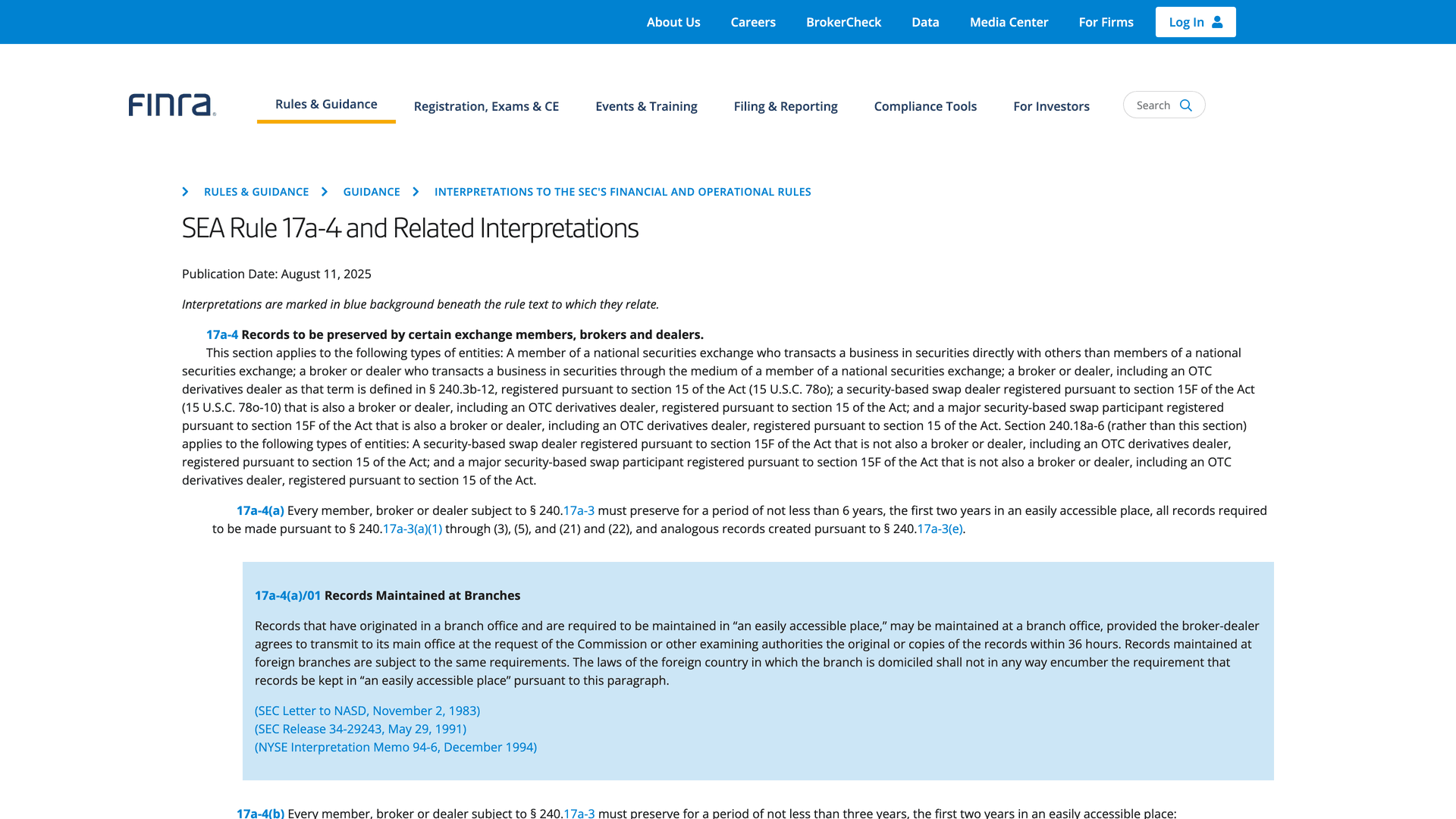
The FINRA guidance page provides authoritative details on record retention timelines for broker-dealers, emphasizing both the minimum retention periods and the technical requirements for immutable archiving. These requirements go beyond what standard email platforms provide, often necessitating specialized compliance archiving solutions.
Secure Email Disposal Requirements (NIST 800-88)
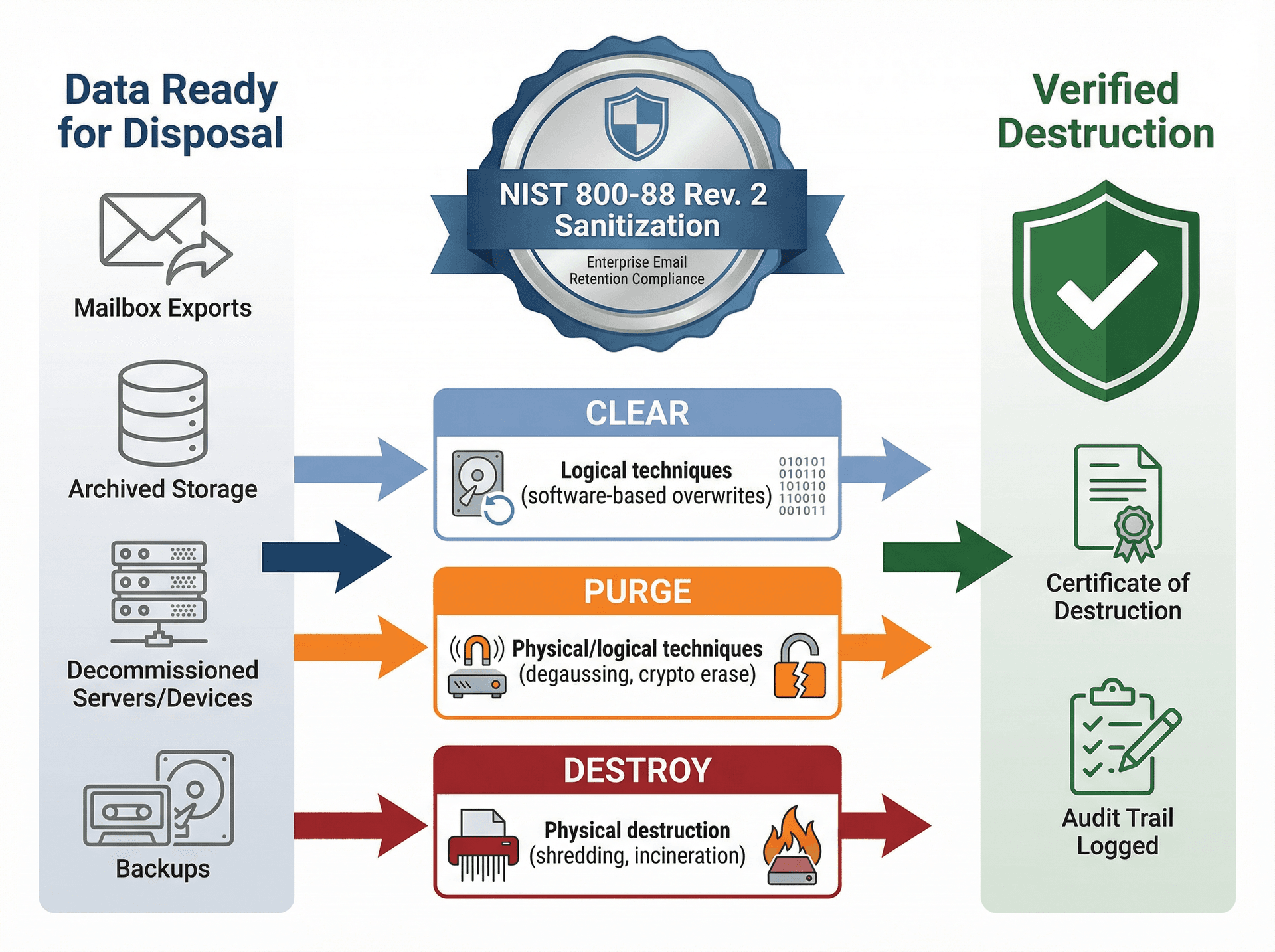
NIST published SP 800-88 Rev. 2 (September 2025) framing media sanitization as making access to target data infeasible, and emphasizing a program with techniques and controls based on sensitivity. Your email retention policy should explicitly tie "disposition" to secure deletion and sanitization practices for archives, exports, and decommissioned systems.
How to Set Email Retention Periods (Step-by-Step)
Use this rule:
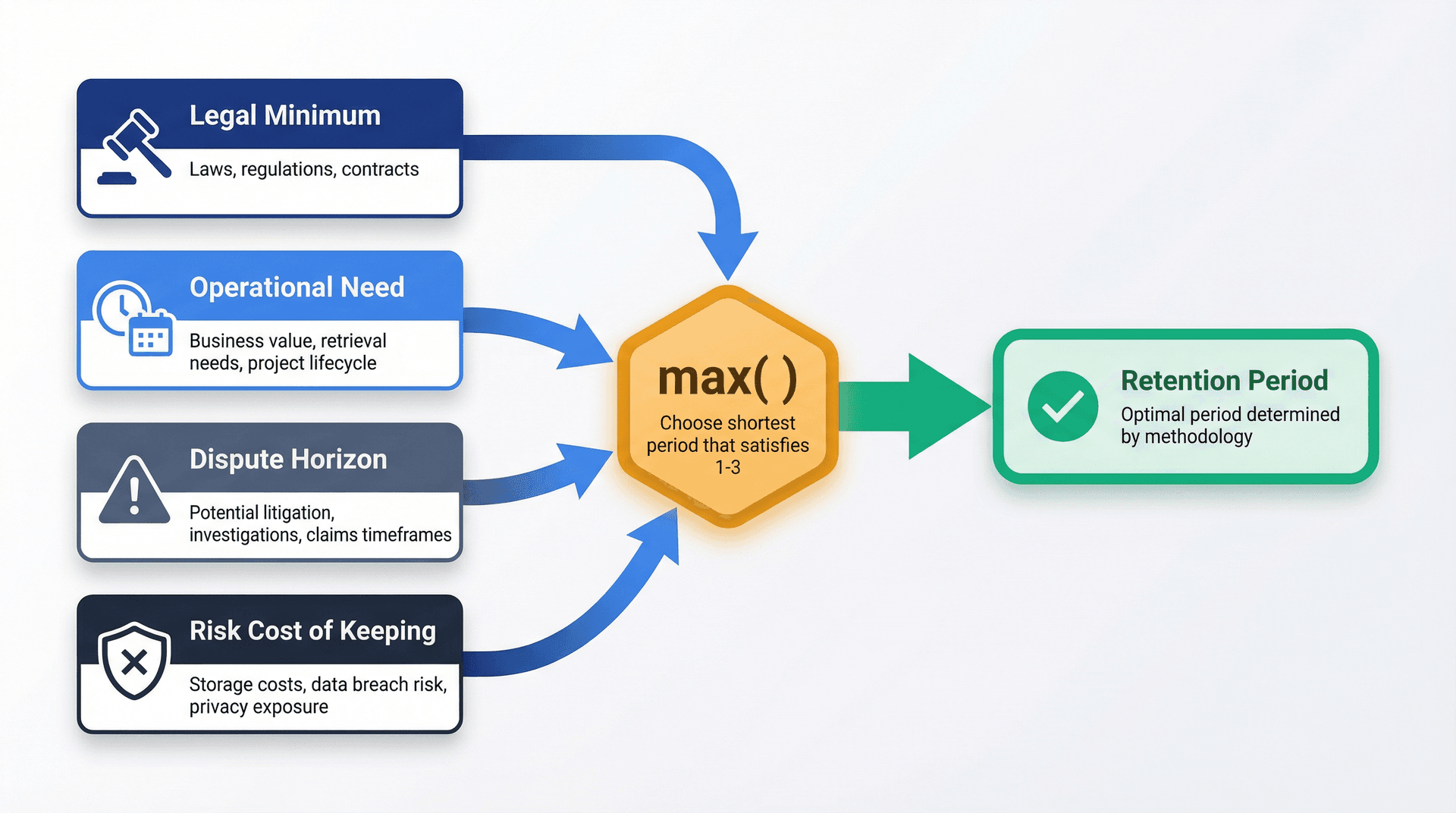
Retention period = max(legal minimum, operational need, dispute horizon)
...but not "forever" unless you can defend forever.
Here's a practical method you can steal. Start with the legal minimum: laws, regulations, and contracts for your industry plus jurisdictions (finance, healthcare, tax, employment, etc.). Then factor in operational need, which is how long teams actually need to search back for customer history, contract context, and incident data. Add the dispute horizon, the typical time window where a decision might be challenged (chargebacks, customer disputes, employment claims). Finally, weigh the risk cost of keeping: breach impact, regulatory exposure, internal embarrassment, and eDiscovery burden.
Then choose the shortest period that satisfies the first three, with exceptions for truly permanent categories.
Microsoft's retention guidance literally calls out the dual goal: comply (retain minimum periods) and reduce risk by deleting old content you're not required to keep.
Google Vault vs Microsoft Purview: Email Retention Comparison
How to Set Up Email Retention in Google Workspace
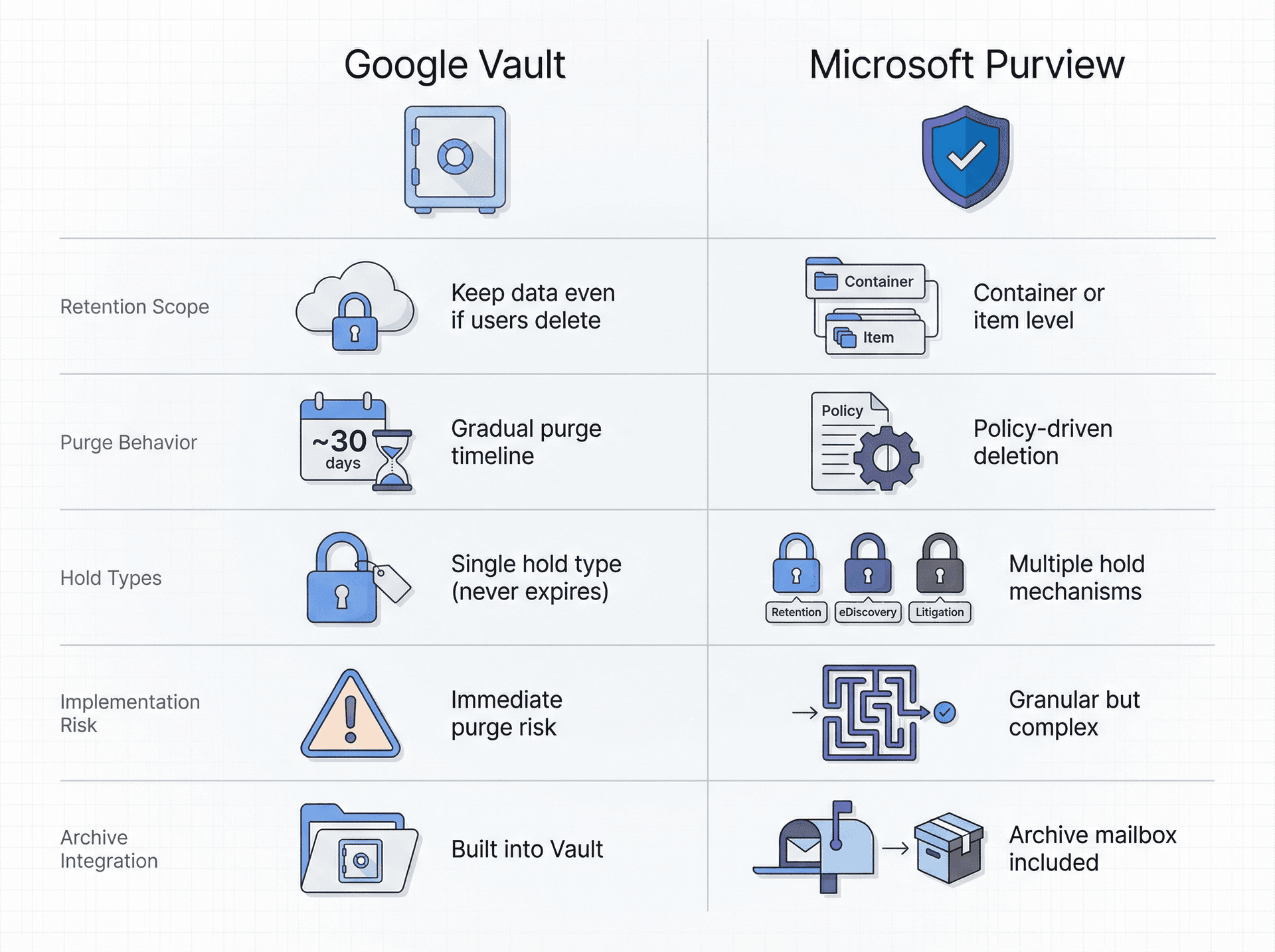
Vault retention rules can keep data even if users delete it, purge data after a duration (and Google warns misconfiguration can immediately and irreversibly purge data), and place holds that override retention rules, never expire, and prevent deletion. Data on hold isn't purged until the hold is removed.
One key gotcha worth designing around: even when a retention rule is set to purge data, Google notes data can remain available in Vault for approximately 30 days before fully purged, and messages may remain available to Vault admins for approximately 30 more days after being removed from users' view. This matters for audits, incident response, and "can we still retrieve it?" expectations.
How to Set Up Email Retention in Microsoft 365
Microsoft Purview retention can retain and delete content at scale ("retain, delete, or retain then delete"), apply at "container level" (mailboxes, sites, teams) or at item level via labels. For Exchange specifically, retention policies/labels cover mail messages (received, drafts, sent) plus attachments, tasks with end dates, and notes (with some exclusions called out).
On the holds side, Microsoft distinguishes retention policy holds, eDiscovery holds, and litigation holds. eDiscovery holds are meant to preserve content for cases/investigations and typically shouldn't last longer than needed for that matter. Litigation hold preserves mailbox content including deleted items and original versions of modified items, and the archive mailbox is also placed on hold.
Google Vault vs Microsoft Purview Feature Comparison
| Capability | Google Vault | Microsoft Purview |
|---|---|---|
| Retention scope | Keep data even if users delete | Retain/delete at container or item level |
| Purge behavior | ~30 days to full purge, ~30 more days admin access | Policy-driven deletion |
| Hold types | Single hold type (overrides retention, never expires) | Multiple: retention policy hold, eDiscovery hold, litigation hold |
| Implementation risk | Misconfiguration can immediately purge | More granular but complex configuration |
| Archive integration | Built into Vault | Archive mailbox included in litigation hold |
Free Email Retention Policy Template (Copy and Paste)
Below is a template you can paste into Confluence, Notion, or Word and customize. Keep bracketed text as "fill this in."
1) Document Control
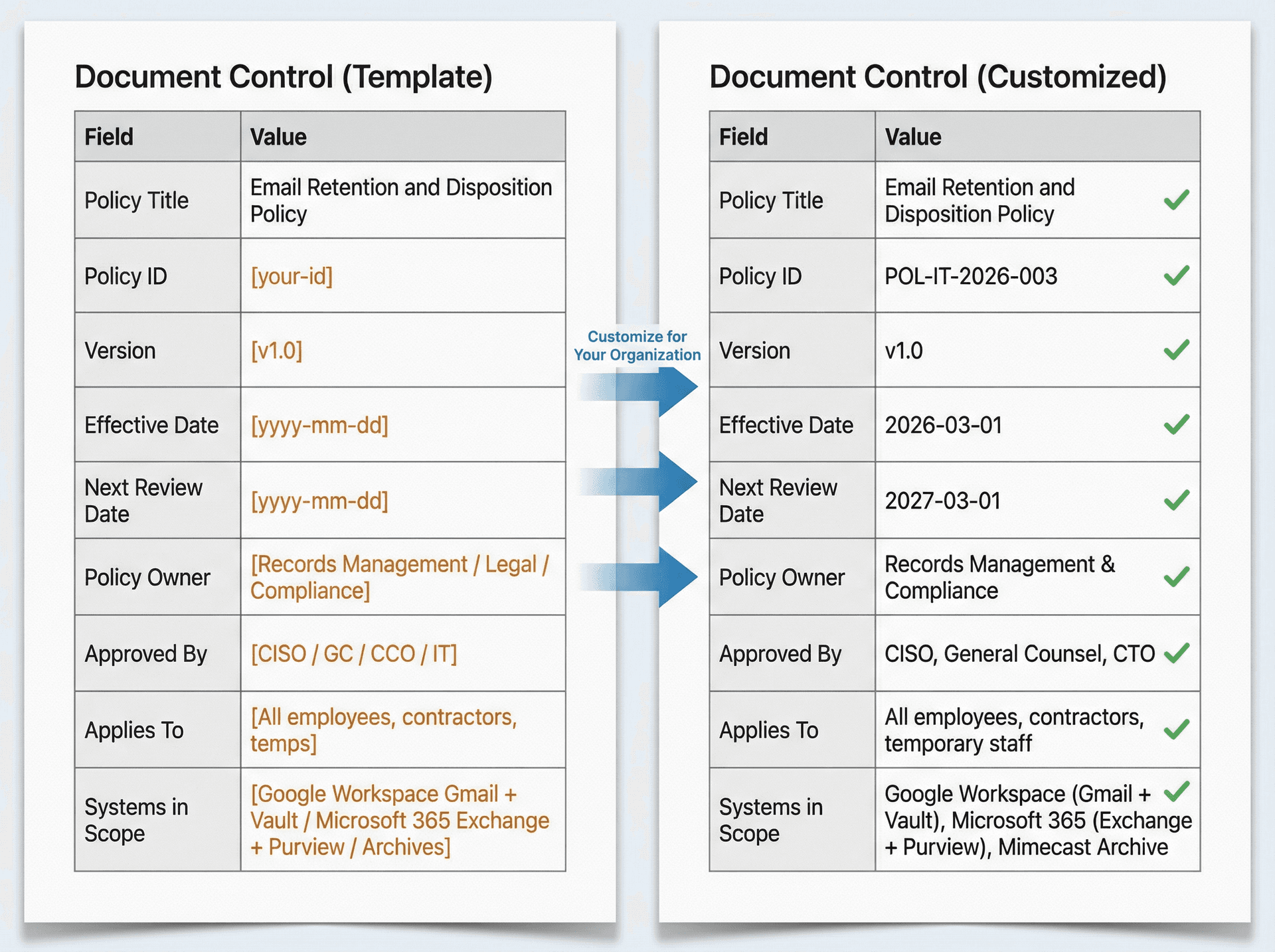
| Field | Value |
|---|---|
| Policy Title | Email Retention and Disposition Policy |
| Policy ID | [your-id] |
| Version | [v1.0] |
| Effective Date | [yyyy-mm-dd] |
| Next Review Date | [yyyy-mm-dd] |
| Policy Owner | [Records Management / Legal / Compliance] |
| Approved By | [CISO / GC / CCO / IT] |
| Applies To | [All employees, contractors, temps] |
| Systems in Scope | [Google Workspace Gmail + Vault / Microsoft 365 Exchange + Purview / Archives] |
2) Purpose
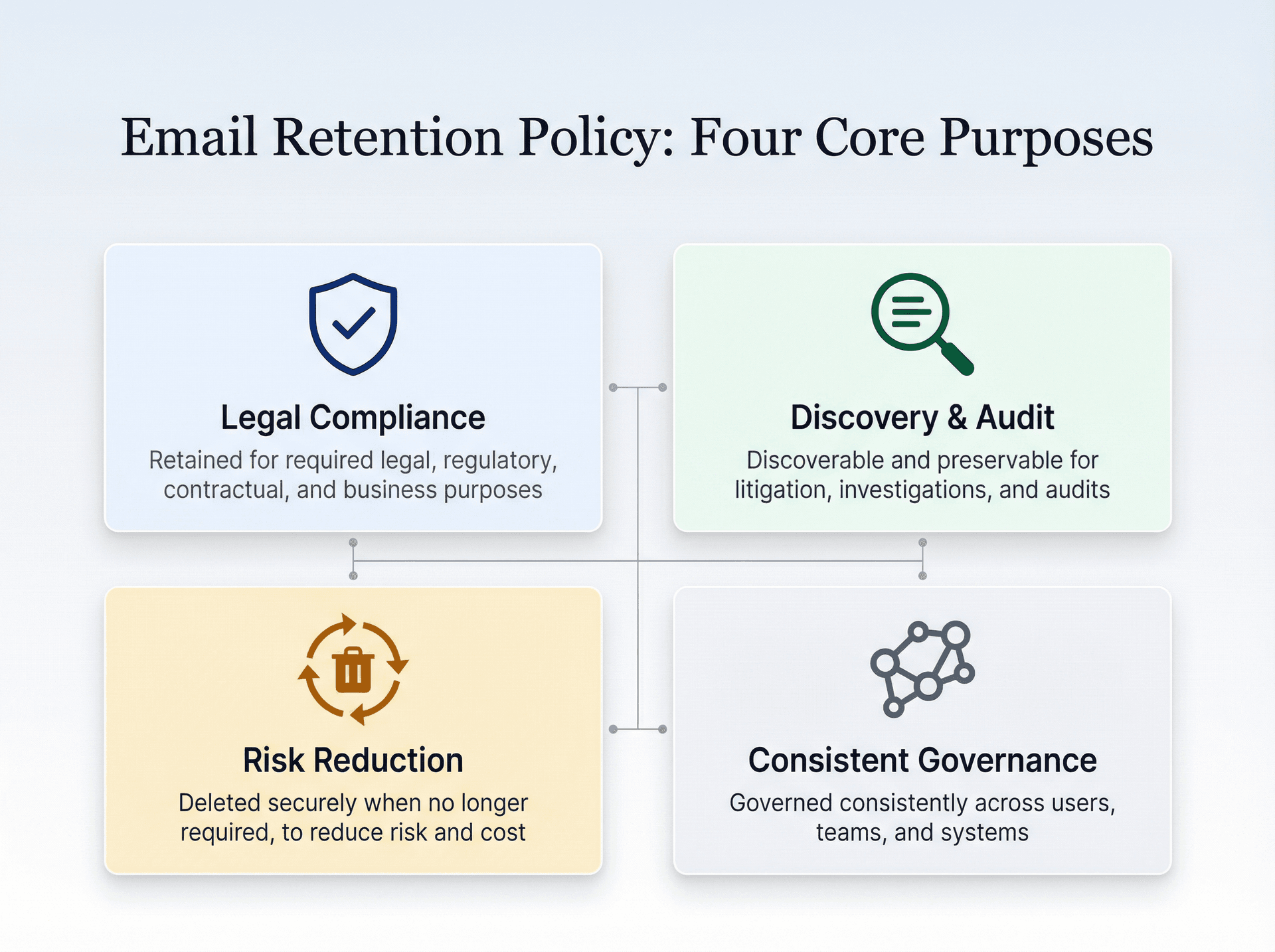
The purpose of this policy is to ensure that company email is retained for required legal, regulatory, contractual, and business purposes; discoverable and preservable for litigation, investigations, and audits; deleted securely when no longer required, to reduce risk and cost; and governed consistently across users, teams, and systems.
3) Scope
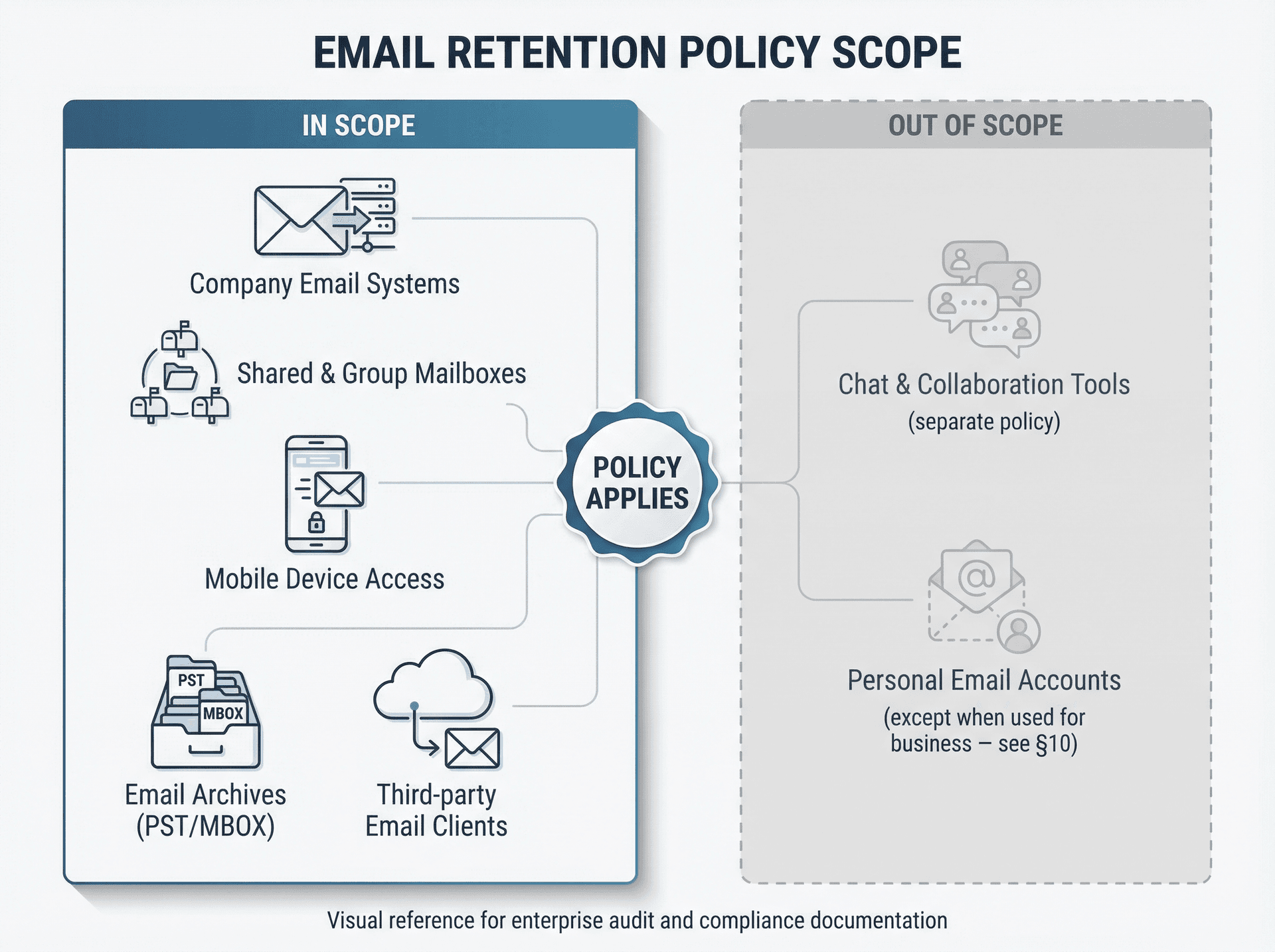
This policy applies to all email messages (received, sent, drafts) and attachments in company-managed mail systems, shared mailboxes, group mailboxes, and delegated mailboxes, email exports/archives (PST/MBOX/eDiscovery exports) stored by the company, and messages accessed on mobile devices and third-party clients when using company accounts.
Out of scope (but referenced): chat tools and collaboration messaging (handled by a separate policy) and non-company email accounts (e.g., personal Gmail) except where used for company business (see section 10).
4) Definitions
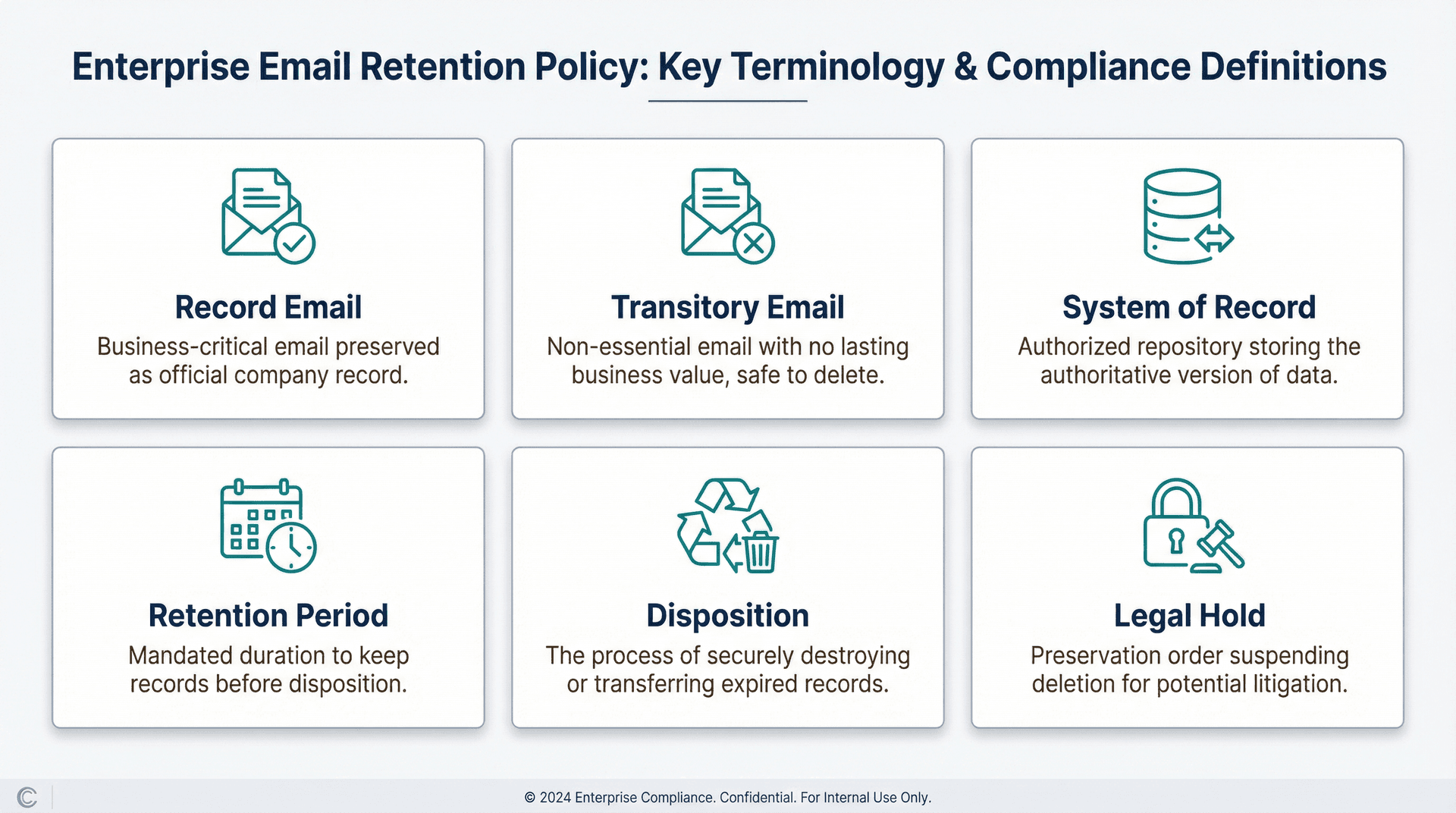
| Term | Definition |
|---|---|
| Record email | An email that documents business activity, decisions, approvals, commitments, transactions, or compliance-relevant communications |
| Transitory email | Short-lived, low-value messages (e.g., scheduling, "thanks," FYIs) that don't document a business record |
| System of record | The authoritative system where a record should live long-term (e.g., CRM for sales, ticketing for support, ERP for invoices) |
| Retention period | The minimum time a record must be retained before it can be disposed of |
| Disposition | The approved action at end of retention (delete, archive, transfer, anonymize) |
| Legal hold | A preservation action that suspends normal deletion/disposition due to litigation/investigation/audit |
5) Policy Statements (The Rules)
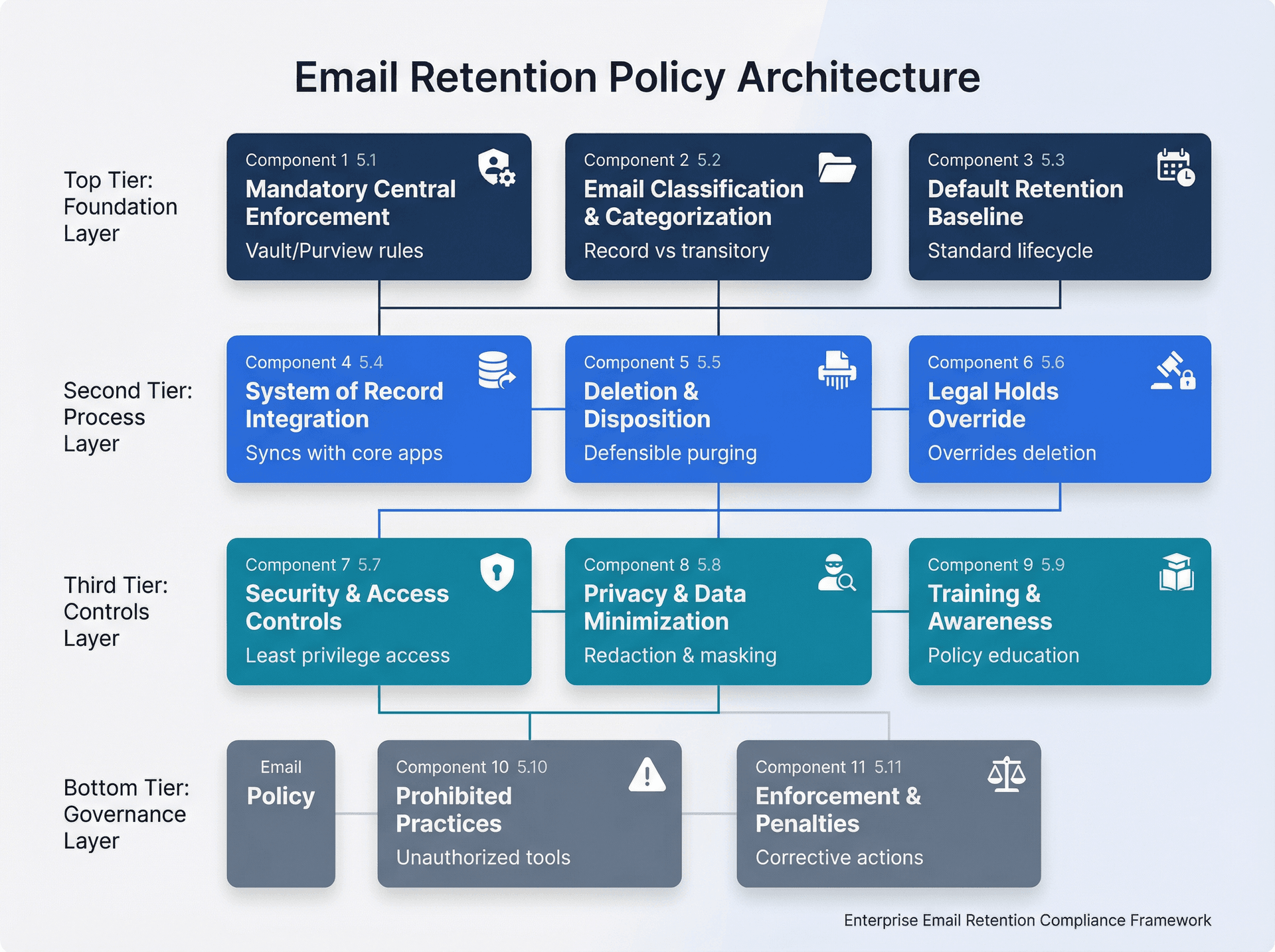
5.1 Retention Is Mandatory and Centrally Enforced
The company enforces retention and deletion using administrator-controlled retention tooling (e.g., Google Vault retention rules/holds; Microsoft Purview retention policies/labels; Exchange litigation holds) to ensure consistent application and auditability. End users must not attempt to "self-manage compliance" by manually deleting or exporting messages to personal storage.
5.2 Classification of Email
Email will be classified into retention categories defined in the Email Retention Schedule (Appendix A). Classification is achieved through default rules (applied broadly), targeted rules for high-risk functions (legal, finance, HR, security), and user actions where required (e.g., moving a message to a "record" folder/label or saving to system of record).
Using AI-powered email automation can help streamline classification by automatically labeling emails based on content, sender, and business rules.
5.3 Default Retention Baseline
Unless a more specific rule applies, email is retained for [X period] and then [deleted / retained indefinitely] according to Appendix A.
5.4 Record Emails Must Be Moved to the Correct System of Record
Where an authoritative system exists (CRM, ERP, ticketing), record emails must be captured there within [N] days. This can be done by saving the email/attachment into the system of record, creating a record in the system of record that references the email and stores key content/attachments, or using an approved integration that captures the message automatically.
Email isn't the preferred long-term archive for records that belong elsewhere.
5.5 Deletion and Disposition
At the end of the retention period, email and related artifacts must be disposed of according to Appendix A, unless a legal hold applies, an exception is approved in writing by [Legal/Compliance], or a contractual or regulatory extension applies. Disposition must be performed in a way that's defensible and secure, consistent with the company's media sanitization and secure deletion standards (see section 8).
5.6 Legal Holds Override Retention
When a legal hold is issued, deletion/disposition must be suspended for the scope of the hold. The hold must be documented (what, who, why, start date, end criteria) and lifted only by [Legal] in writing. Upon release, normal retention rules resume (unless replaced by another hold).
5.7 Security and Access Controls
Email retention systems must support least-privilege access for admins and reviewers, strong authentication (MFA) for privileged access, logging/audit trails for retention configuration changes, holds, and exports, encryption in transit and at rest where supported, and controls for exports (see section 9).
For organizations prioritizing security and compliance, SOC 2 compliant email tools can provide the necessary controls and auditability.
5.8 Privacy and Data Minimization
Email retention must be consistent with privacy principles requiring that personal data isn't kept longer than necessary. Retention periods should be justified and documented for categories that commonly contain personal data (HR, recruiting, customer support, sales).
5.9 Training and Awareness
All users must complete annual training covering what counts as a record email, how to capture records into the correct system, what not to do (personal exports, shadow archives, personal forwarding), and how to respond to legal hold notices.
5.10 Prohibited Practices and Exceptions
The following practices are prohibited unless explicitly approved: using personal email for company business, auto-forwarding company email to personal accounts, storing email archives in unapproved cloud drives, and creating "shadow retention" via local PST/MBOX files. Exceptions require written approval by [Legal/Compliance/IT] and must be time-bounded.
5.11 Enforcement
Violations may lead to disciplinary action up to termination, and may expose the company to legal/regulatory penalties.
6) Roles and Responsibilities
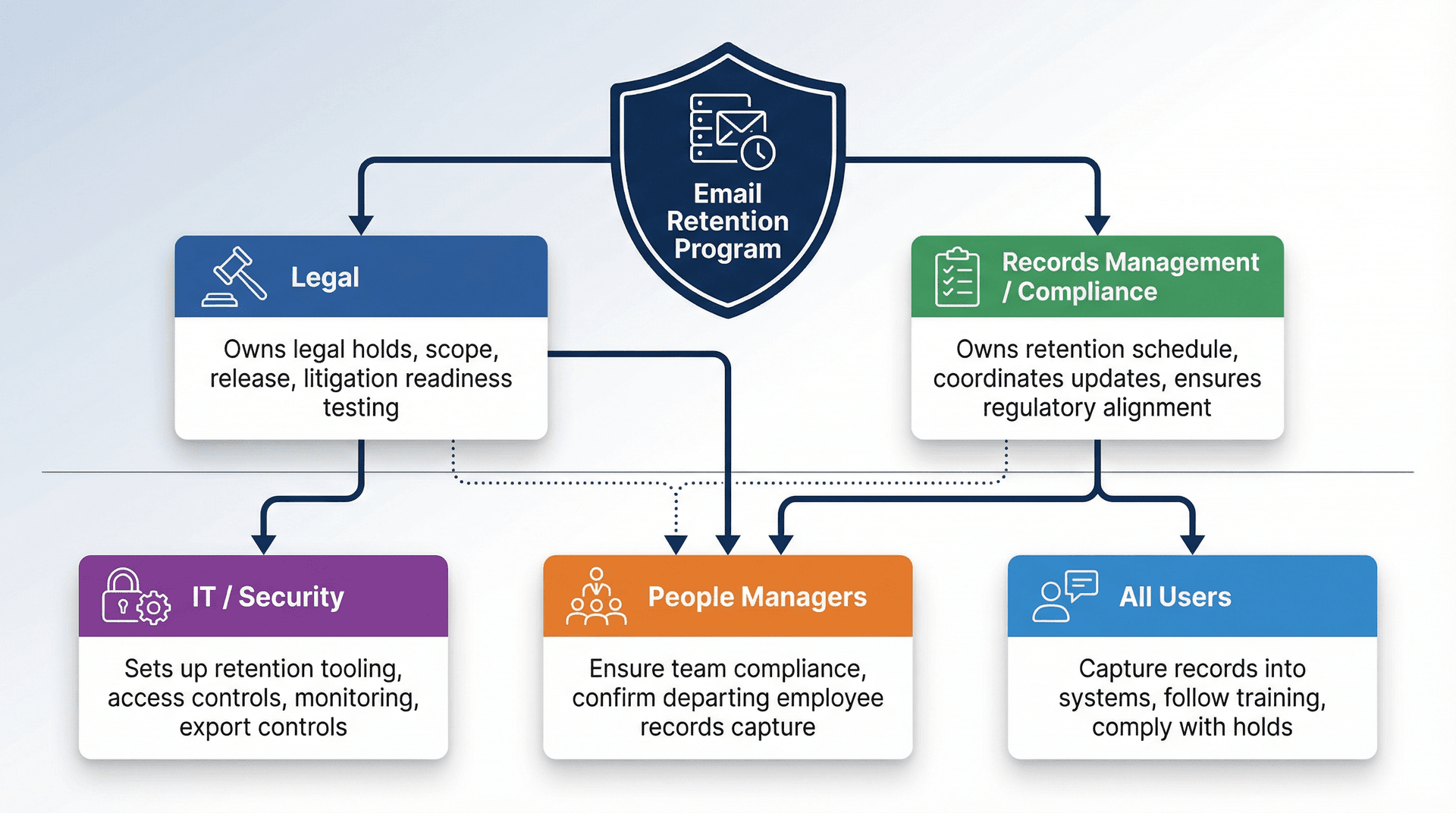
| Role | Responsibilities |
|---|---|
| Legal | Owns legal holds, scope, release, and litigation readiness testing |
| Records Management / Compliance | Owns retention schedule; coordinates updates; ensures policy alignment to regulations |
| IT / Security | Sets up and maintains retention tooling; access controls; monitoring; export controls |
| People Managers | Ensure team compliance; confirm departing employees' records capture steps |
| All Users | Capture records into systems of record; follow training; comply with holds |
For teams managing high email volumes, putting shared mailbox management best practices in place can help ensure consistent retention policy application across shared resources.
7) Review Cycle
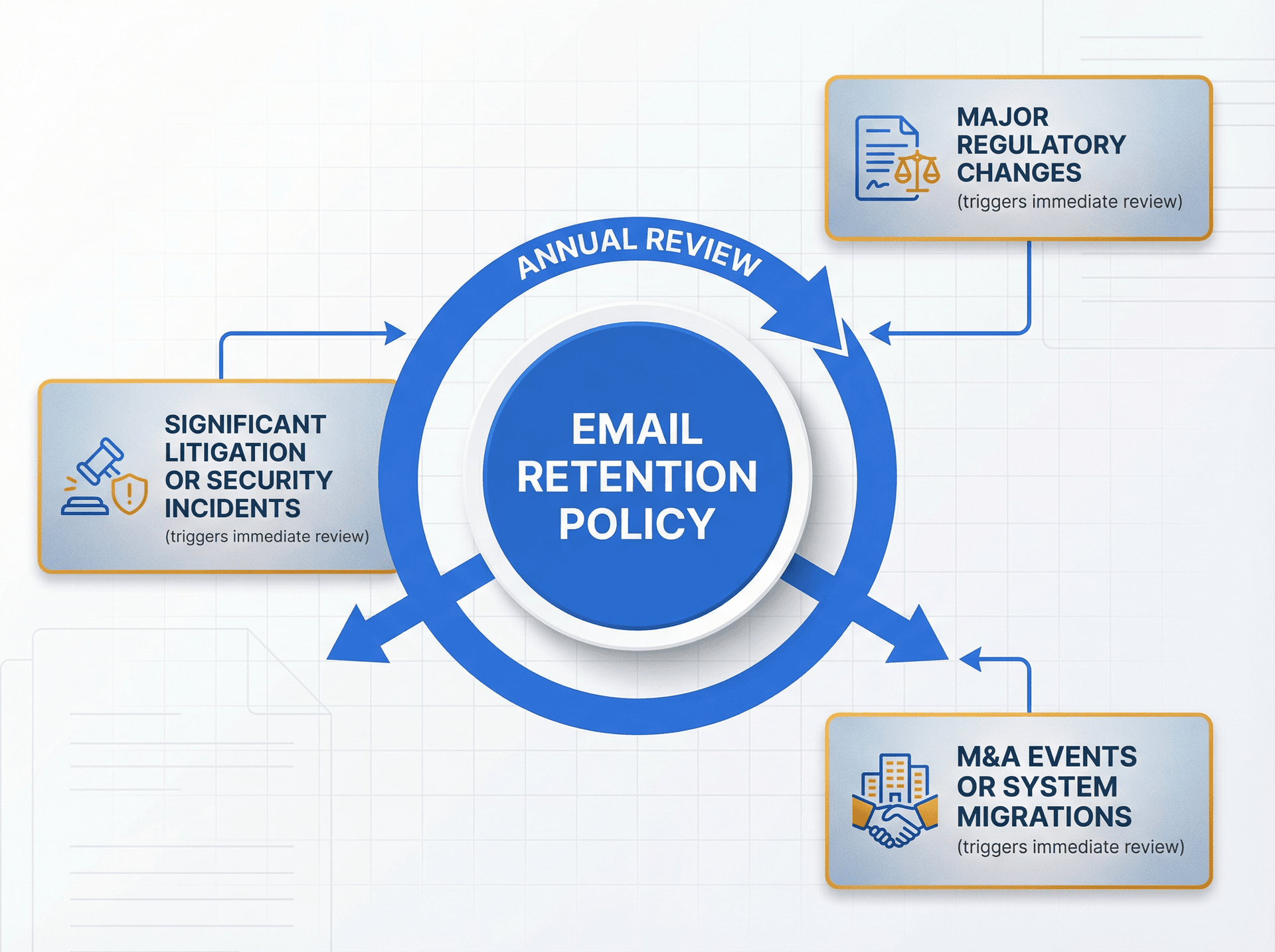
This policy and the retention schedule must be reviewed at least annually and after major regulatory changes, M&A events or system migrations, and significant litigation or security incidents.
8) Secure Disposal Standard (Brief)
Disposition must follow the company's secure disposal program aligned with recognized media sanitization guidance (see NIST SP 800-88 Rev. 2). This includes controls for mailbox exports, archived storage, decommissioned servers/devices, and backups where applicable.
9) Export and eDiscovery Controls
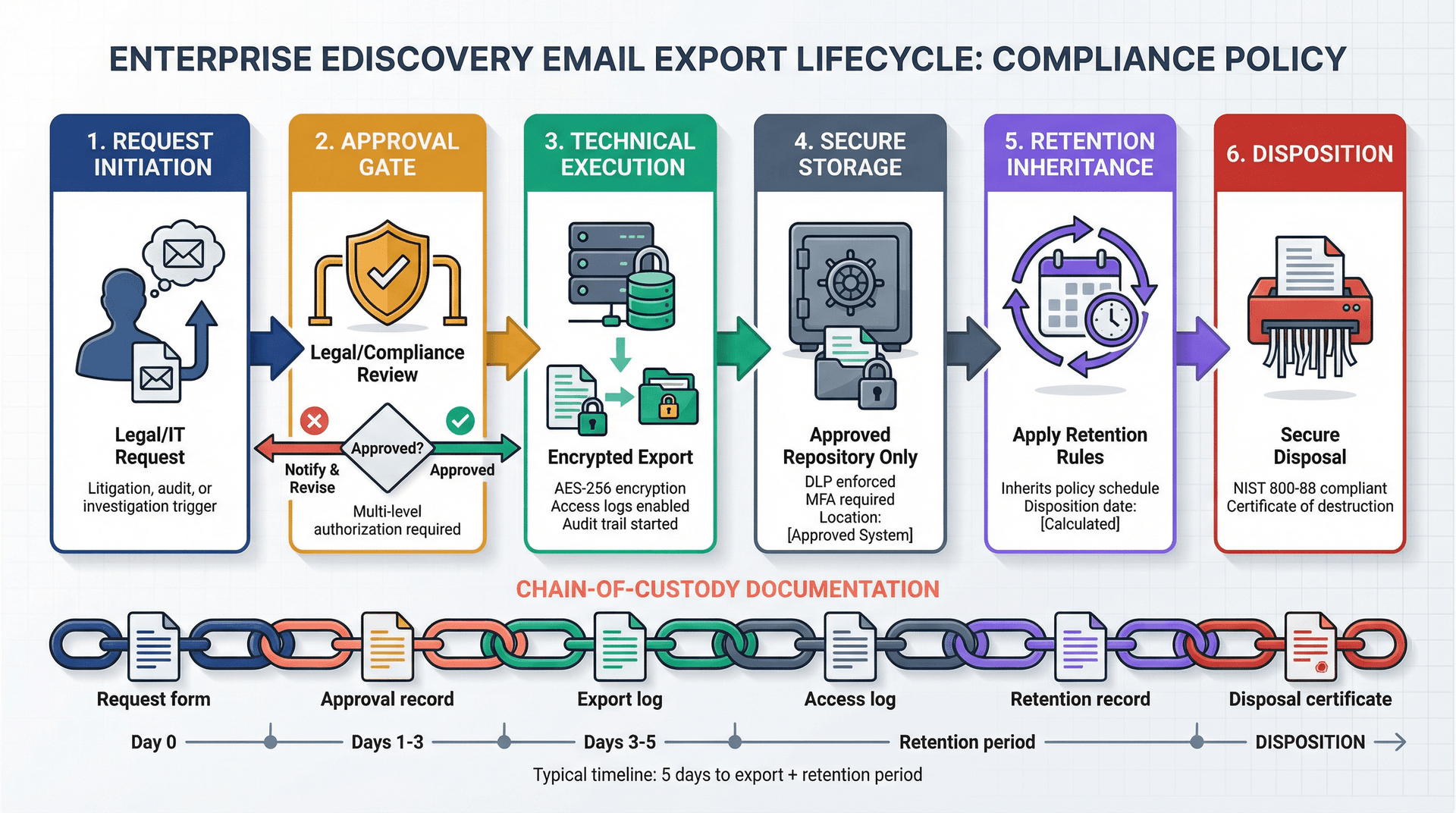
Exports must be approved by [Legal/Compliance], encrypted, and stored only in approved repositories. They must inherit retention rules (or be disposed of on a defined schedule), and chain-of-custody must be documented for litigation-grade exports.
10) Appendix A: Email Retention Schedule (Starter)
Use this as a starting point. Replace periods with your actual requirements.
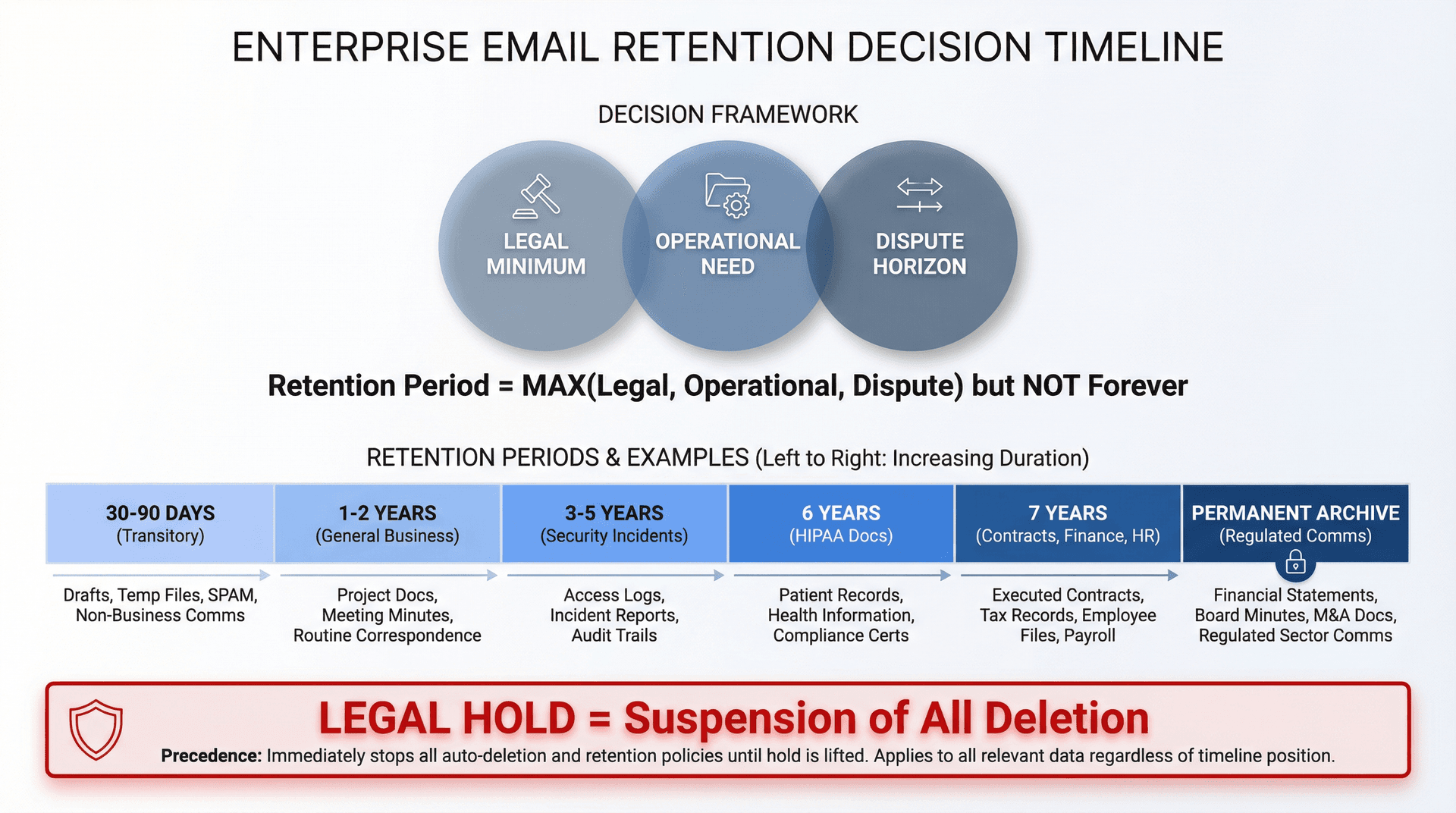
| Category | Examples | Typical Disposition | Retention Driver to Verify |
|---|---|---|---|
| Transitory | Scheduling, quick FYIs, "thanks" | Delete after 30-90 days | Operational only |
| General Business Correspondence | Internal decisions, project comms | Retain 1-2 years then delete | Dispute horizon |
| Contracts + Commitments | Signed agreements, amendments, key approvals | Retain 7 years then delete | Contract + statute limits |
| Finance + Audit-Related | Invoices, approvals, close process | Retain 7 years then delete | E.g., SOX example often uses 7 years |
| Regulated Comms (Broker-Dealer) | Customer order comms, supervision-relevant | Retain + immutable archive | FINRA/SEC minimums (3-6 years) |
| HIPAA Security Documentation | Required HIPAA policies/procedures docs | Retain 6 years then delete | 6 years requirement |
| HR + Recruiting | Offer letters, performance, candidate comms | Retain 7 years then delete | Employment law + privacy |
| Security Incidents | Breach response comms, investigation decisions | Retain 3-5 years then delete | Incident response + audit |
| Legal Holds | Any of the above under hold | Retain until release | Hold overrides retention |
To finalize the numbers, document (a) legal minimum, (b) operational need, (c) dispute horizon, and (d) privacy minimization justification for each row. Keep that as your "defensibility memo."
How to Implement Email Retention Policies
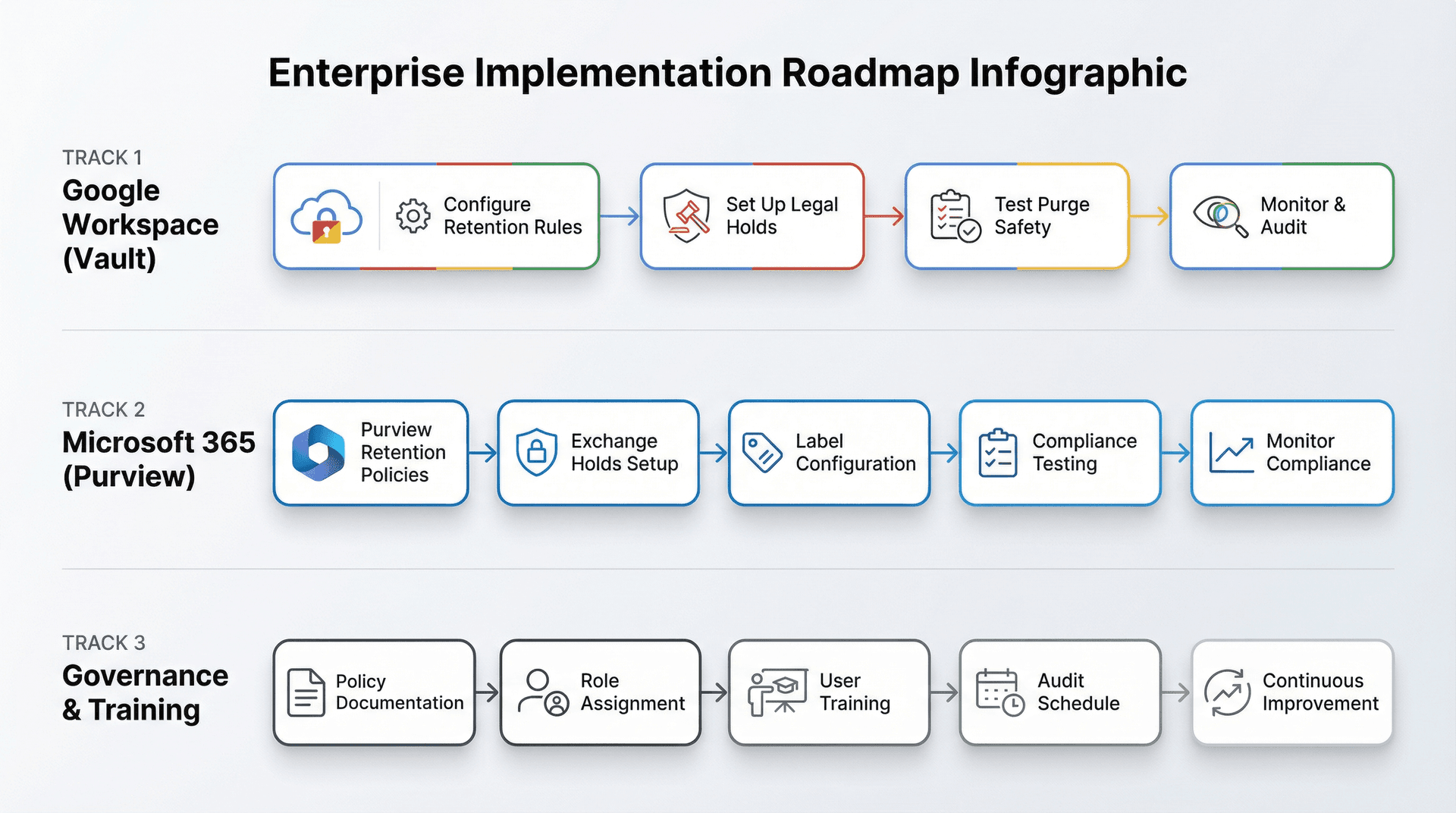
Google Workspace Email Retention Setup Guide
What Google Vault Retention Rules Actually Do
Vault retention rules control how long Google Workspace data is saved and when it's deleted. By default, Google Workspace data stays in accounts until user/admin deletes it, but Vault lets you retain data even if users delete it and lets you purge after a set duration.
Warning worth taking seriously: Google explicitly warns that a misconfigured retention rule can immediately and irreversibly purge data, and recommends testing new rules on a small group first.
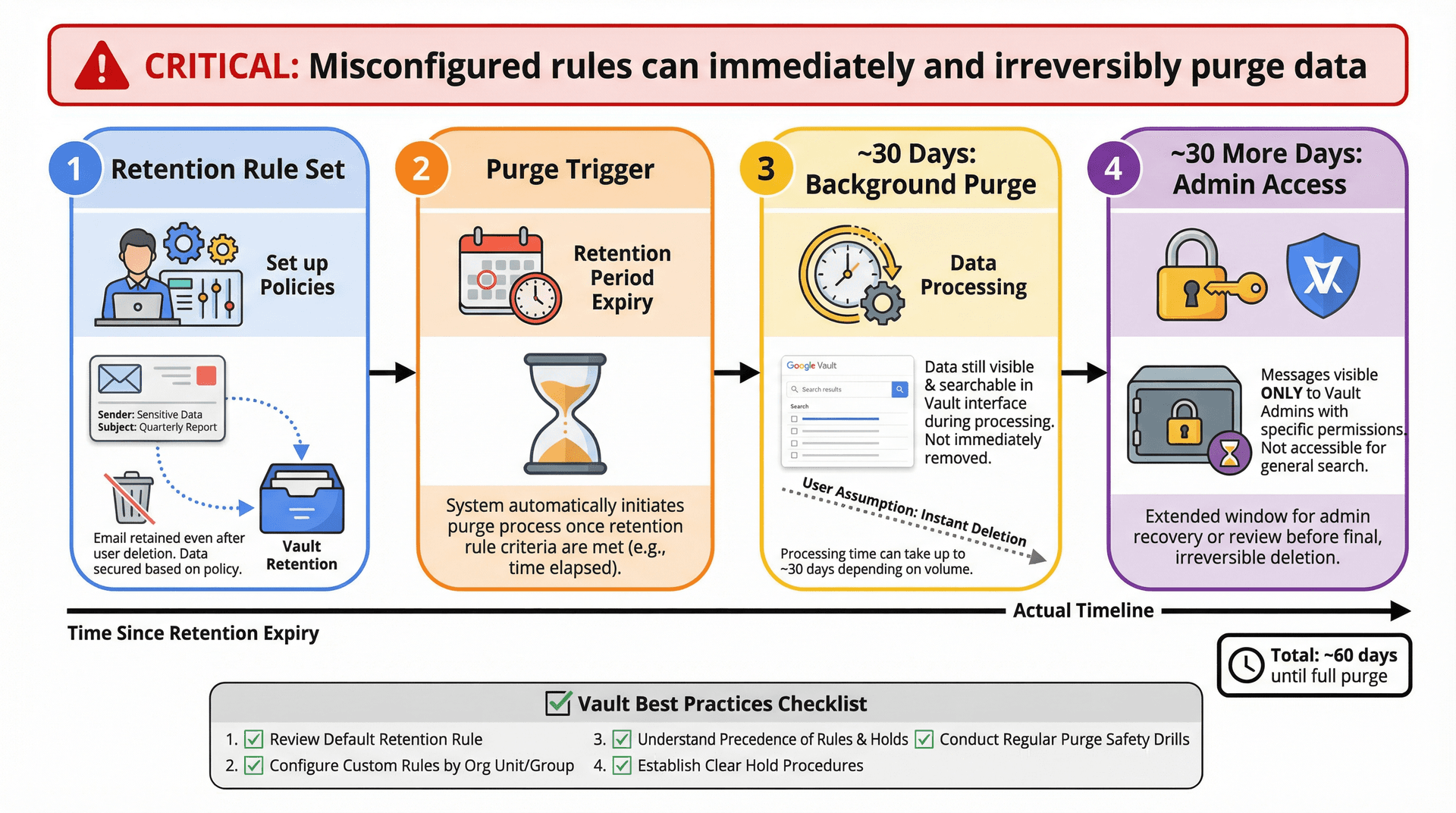
Gmail Retention Configuration Checklist
- Set a default Gmail retention rule (your baseline)
- Create custom rules for high-risk org units/groups or message conditions
- Document precedence: custom rules override default; if multiple rules match, longest period wins
- Define a hold procedure: holds never expire and override retention rules
- Do a "purge safety drill" in a sandbox or small OU before global rollout (Google's own guidance)
Google Vault Data Purge Timeline Explained
Vault notes that even when set to purge, the background purge process can leave data available to Vault for approximately 30 days; and Gmail messages may remain available to Vault admins for approximately 30 more days after users lose access.
Don't promise teams "it's gone instantly." And don't assume "trash empty" means "irretrievable."
Microsoft 365 Email Retention Setup Guide
What Microsoft Purview Retention Does
Microsoft frames retention as a compliance plus risk tool: retain for minimum periods and delete old content you don't need to reduce litigation and security breach risk. A retention policy can be used to decide to retain, delete, or retain-then-delete content, and it works efficiently by applying settings at the container level (like Exchange mailboxes).
Exchange specifics matter: Purview retention can retain/delete mail messages (received, drafts, sent) with attachments, plus certain other mailbox item types; but some items (like contacts) aren't supported for Exchange retention policies/labels.
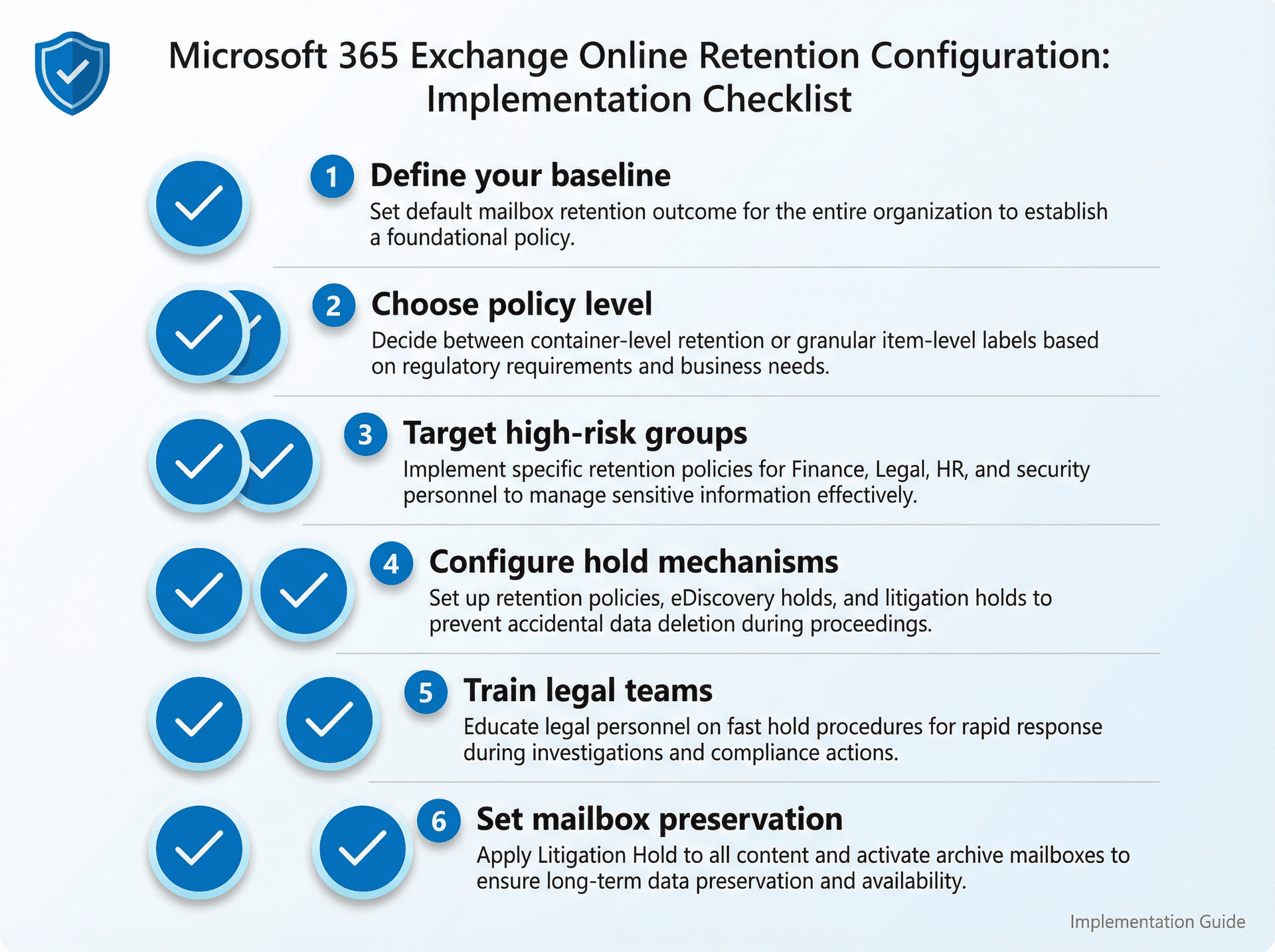
Exchange Online Retention Configuration Checklist
- Define your baseline: what's the default mailbox retention outcome?
- Decide whether you need container-level policies (most common) vs item-level labels (for finer classification)
- Set up targeted retention for high-risk groups (finance, legal, HR, security)
- Set up holds: Microsoft documents multiple hold mechanisms (retention policy hold, eDiscovery holds, litigation hold)
- Train legal on "fast hold": eDiscovery holds are for cases/investigations; don't use them as a lazy permanent archive
- For mailbox-level preservation: litigation hold preserves all mailbox content including deleted items and original versions of modified items; archive mailbox is also held
Advanced Email Retention Strategies That Actually Work
Why Manual Email Retention Tagging Fails at Scale
A strong lesson from government archives: user-by-user manual retention is unreliable at scale. The NY State Archives guide discusses the "capstone" approach (originally from NARA) as a response, managing retention based on the account holder's role instead of requiring users to tag every email.
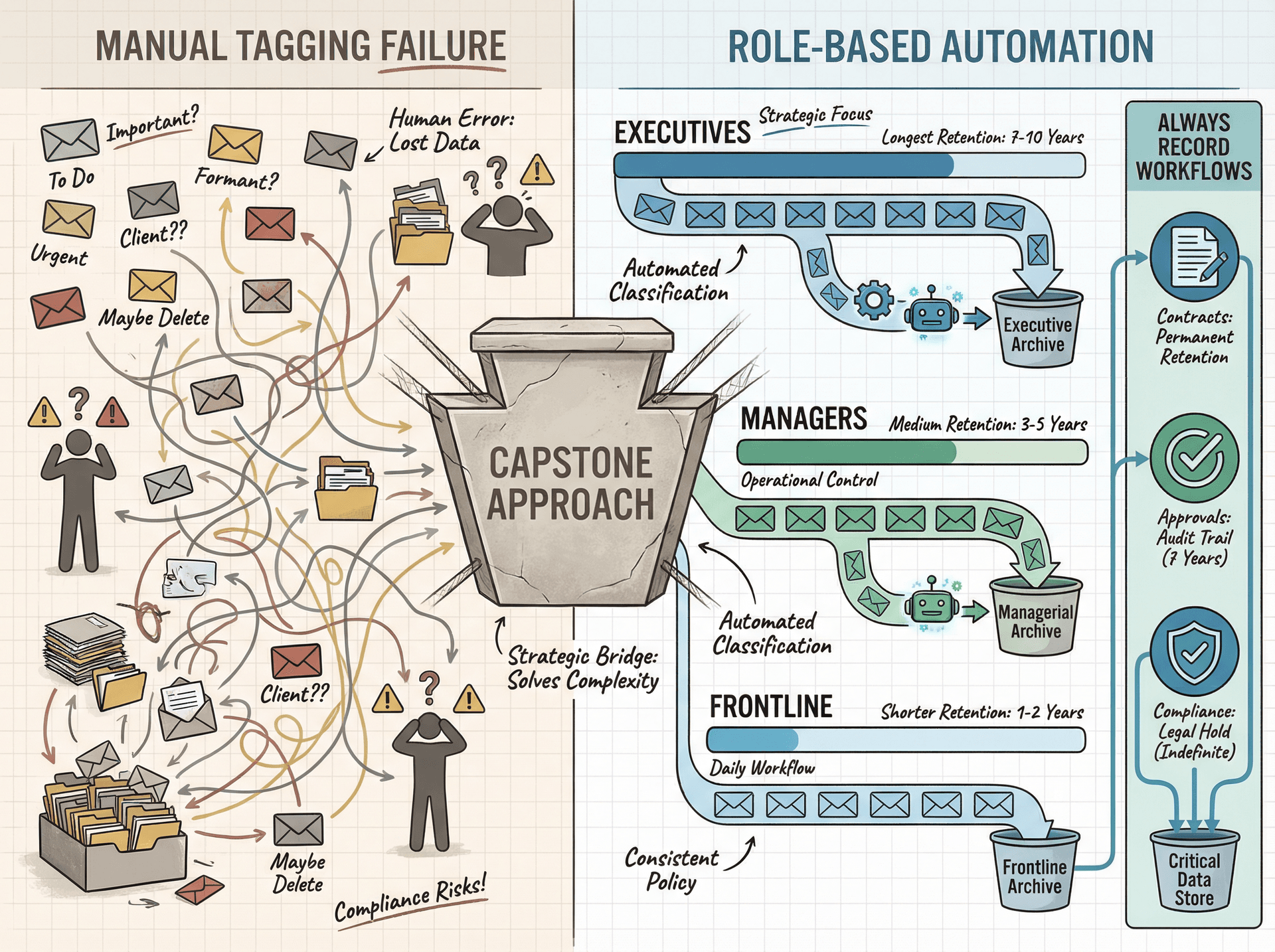
The enterprise pattern that works best combines role-based baseline retention (executives longer, frontline shorter) with a small set of "always record" workflows (contracts, approvals, regulated comms). Using email management tips and automation can significantly reduce the burden on individual users while improving compliance.
How to Handle Email Exports in Retention Policies
Your biggest retention failure isn't "Gmail vs Outlook." It's PST/MBOX exports, eDiscovery exports sitting in random drives, and employees keeping "just in case" archives.
Make export storage and retention explicit in policy (section 9). Enforce encryption, access controls, and disposal.
Why Email Disposal Is a Security Control
Use NIST SP 800-88 Rev. 2 as your anchor for secure disposal language and program design (published September 2025; updated September 26, 2025).
Where Inbox Zero Fits in Email Retention Programs
Inbox Zero is an AI email assistant that works inside Gmail/Google Workspace and Microsoft Outlook/Microsoft 365. We also ship a Chrome extension that adds custom tabs inside Gmail.
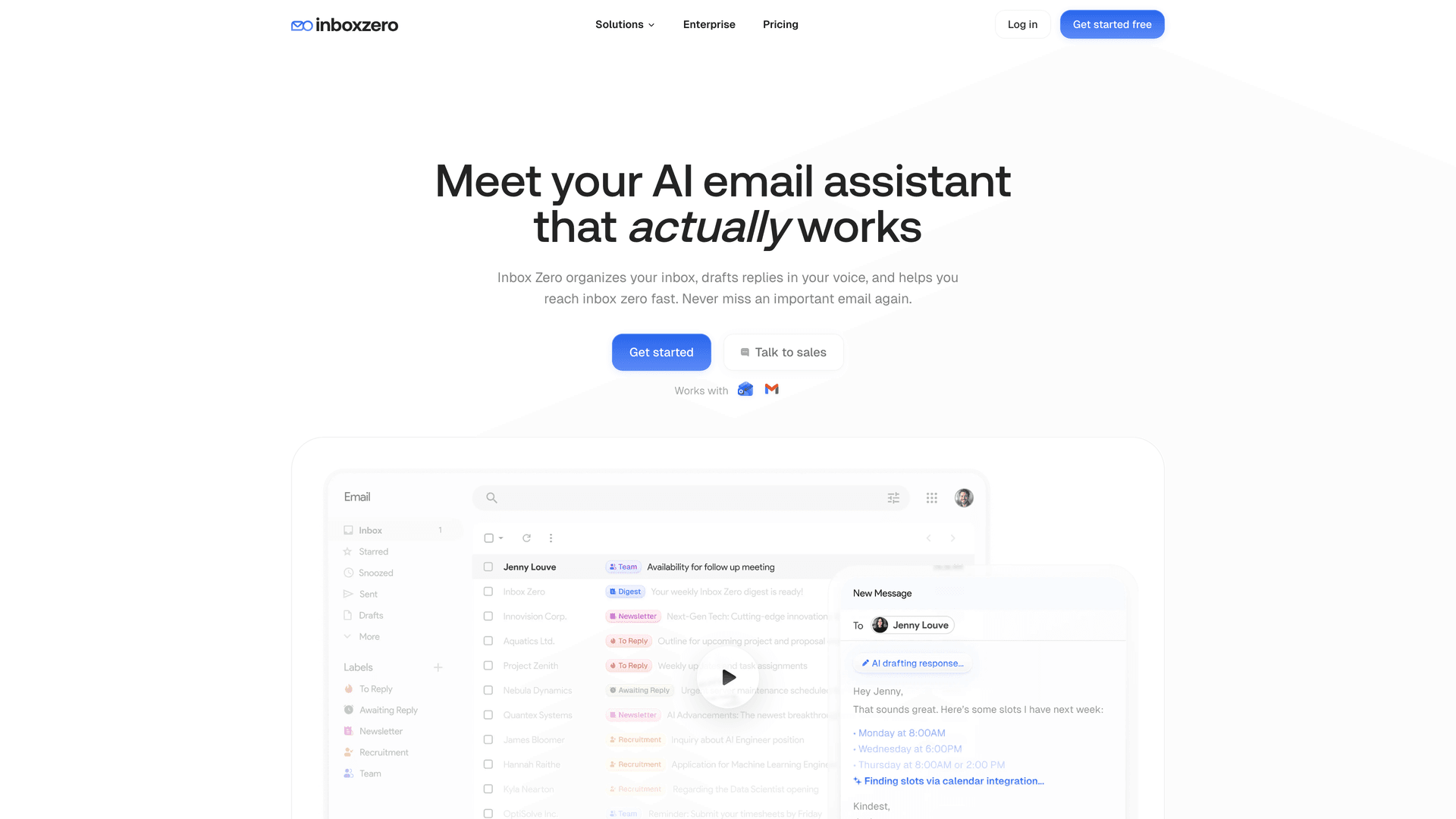
The Inbox Zero platform provides AI-powered classification, automated routing, and workflow tools that work as a layer on top of your existing email system. This makes it practical to enforce the retention policies you design, without adding burden to end users.
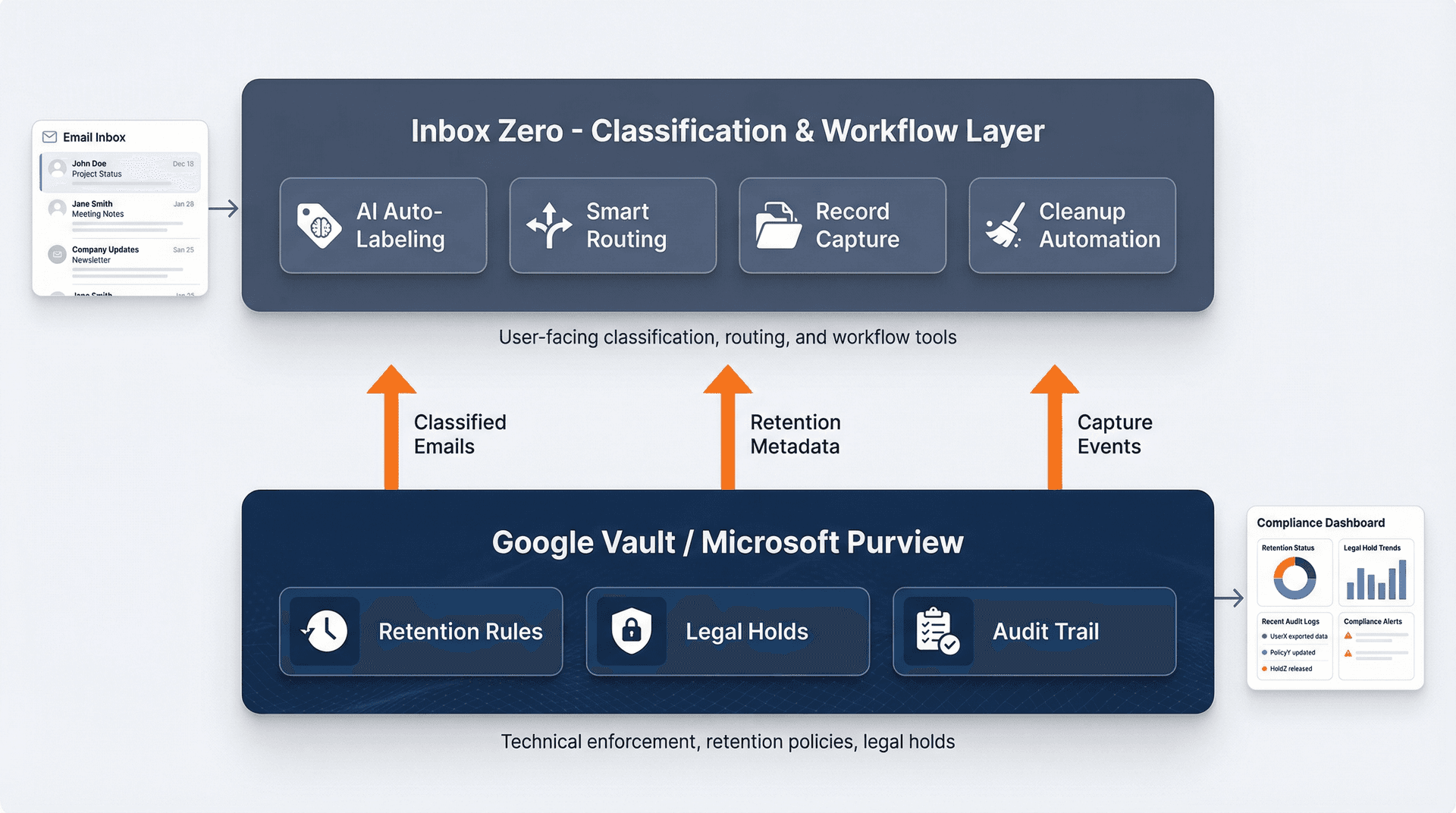
Here's the honest way to position Inbox Zero in an enterprise retention program: Vault/Purview are your enforcement layer (retention + holds + defensibility), and Inbox Zero is your workflow and classification layer (labels, routing, drafts, cleanup).
Our Chrome extension ("Inbox Zero Tabs for Gmail") is positioned as "100% private" with no data collection, storing settings locally. The listing shows version 1.0.3 updated October 16, 2025.
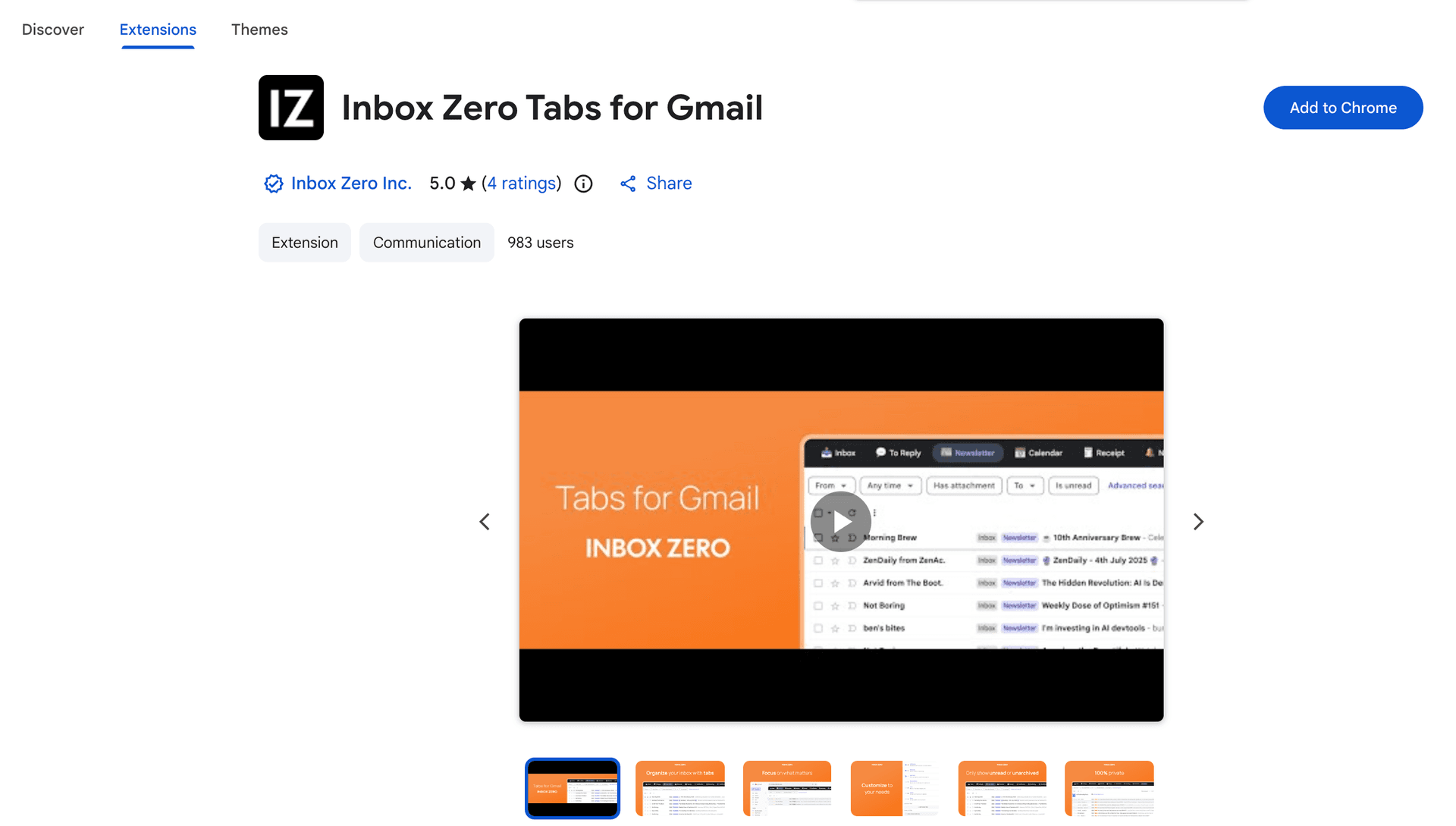
The Chrome extension listing validates our privacy-first approach. By storing all settings locally in the browser with zero server calls, the extension helps users organize their Gmail inbox without introducing additional data governance concerns, a critical consideration for retention compliance programs.
How AI Email Tools Support Retention Compliance
You can create tabs for "to file," "needs capture," "contracts," "invoices," and "HR" so users actually move record emails into the right system of record. Using our email AI automation, you can automatically label and route emails that look like records based on content, sender, and business rules, reducing manual classification errors.
You can also use rules to label emails that look like records and route them into a review queue for human approval. Our AI personal assistant can identify record-worthy emails based on your criteria and flag them for proper capture before they're lost in the noise.
Reducing inbox clutter is another piece of the puzzle, so users don't hoard everything "because I can't find it later." Our bulk email unsubscriber helps teams systematically clean up newsletters and marketing emails that are clogging retention systems unnecessarily. Combined with our cold email blocker, teams can focus on actual business records rather than noise.
You can also gain visibility into email patterns through email analytics to identify which senders, domains, and categories are generating the most retention overhead.
At Inbox Zero, we help teams put email management workflows in place that complement formal retention enforcement. You still need Vault or Purview to handle the legal heavy lifting. We make sure emails get tagged, routed, and cleaned up before they hit those systems.
Think of it this way: Inbox Zero helps your team identify what matters (classification), while Vault/Purview ensure what matters is kept for the right amount of time (enforcement).
For enterprise organizations looking to put comprehensive email governance in place, explore our enterprise solutions designed for security, compliance, and scale.
30-Day Email Retention Policy Rollout Plan
Week 1: Design Sprint
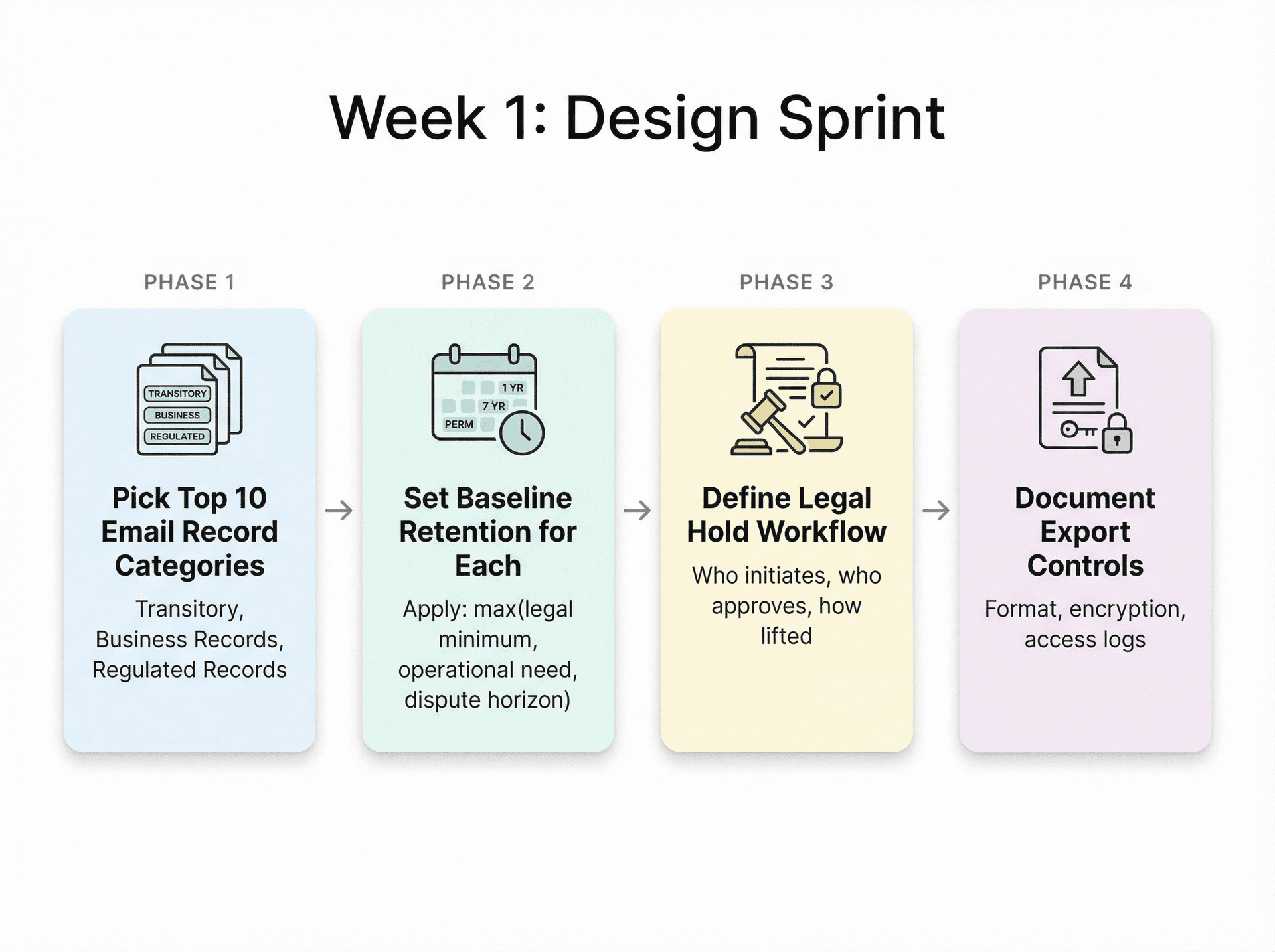
Pick your top 10 email record categories and set baseline retention for each using the method above. Define your legal hold workflow and document export controls. Getting these four things nailed down in the first week gives you the foundation everything else builds on.
Week 2: Configure + Test
Set up your baseline retention in Vault or Purview, configure holds, and test retrieval. Run a "purge safety test" in a small group first (Google explicitly recommends this). This is where you catch misconfiguration before it causes irreversible damage.
Week 3: Pilot
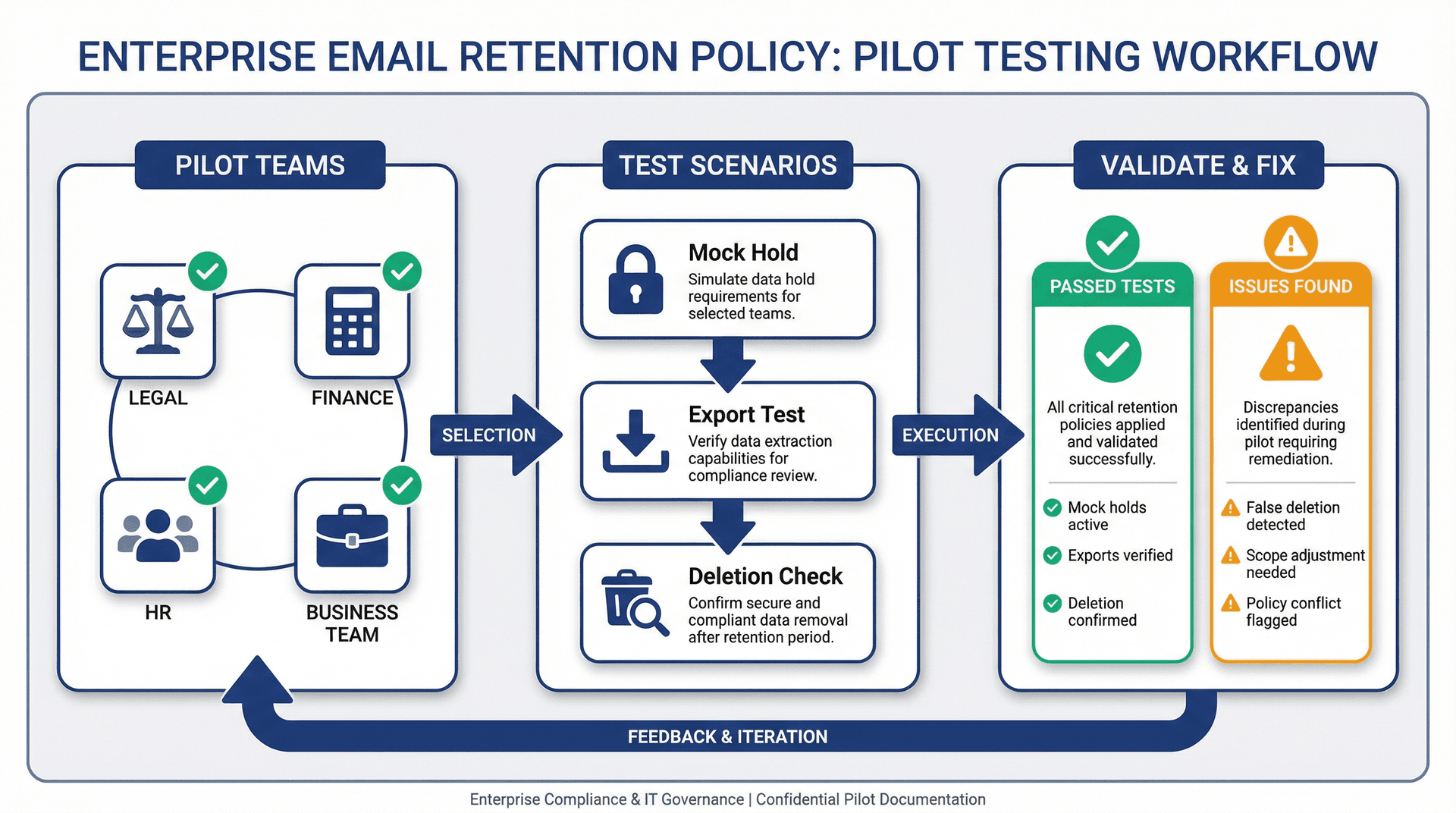
Pilot with legal, finance, HR, and one business team. Run a mock hold and export to validate the workflow end-to-end, and check for false deletions so you can fix scopes before broad rollout. Consider putting email management software in place alongside your retention configuration to provide teams with practical tools for day-to-day compliance.
Week 4: Rollout + Training
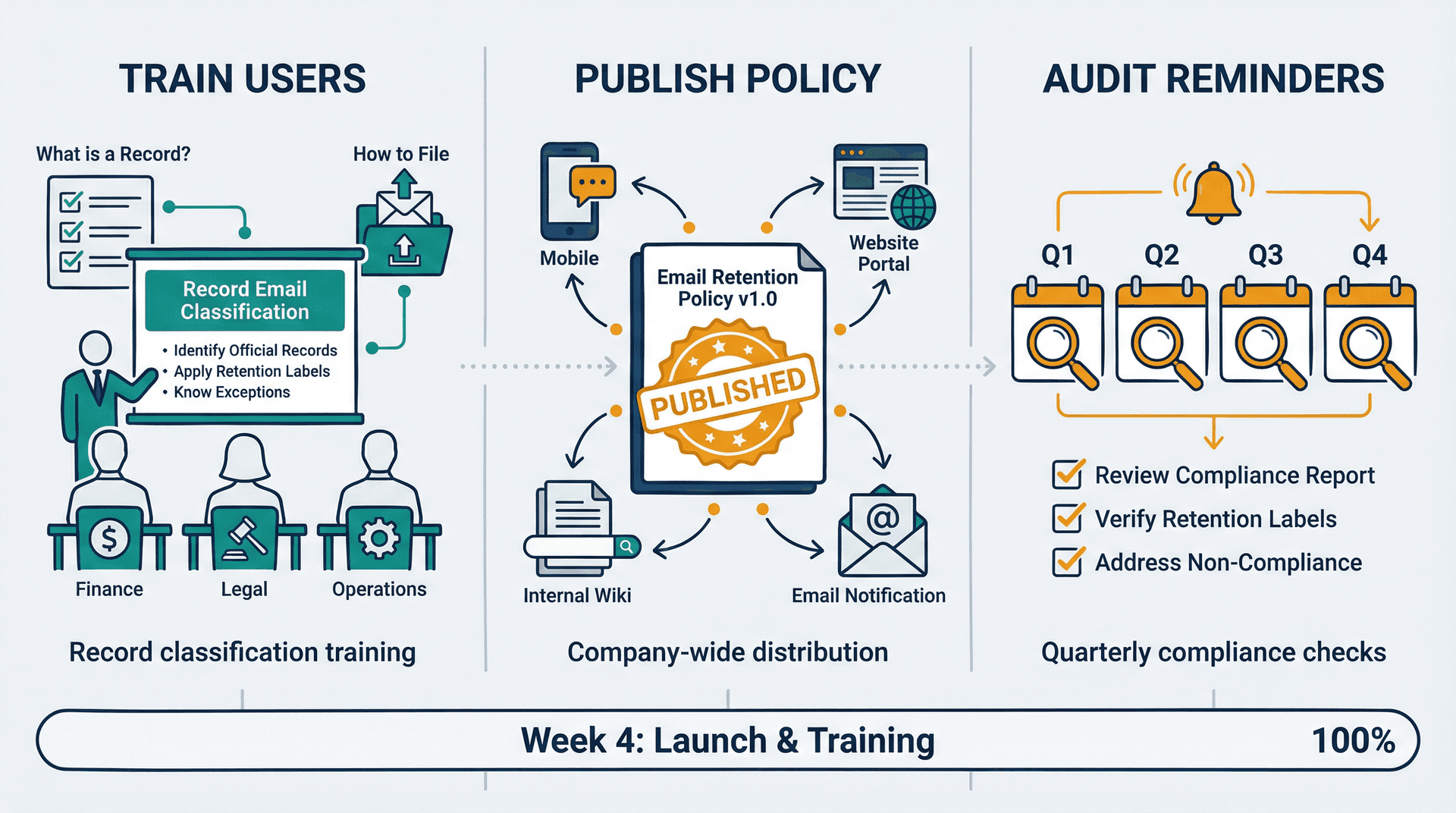
Train users on "what is a record email" and "how to capture it," publish the policy and retention schedule, and set quarterly audit reminders. Training should include practical guidance on how to manage your inbox in a way that supports retention policy compliance.
Email Retention Policy FAQs (Pre-Audit Questions)
Can We Just Keep All Emails Forever?
You can, but you're volunteering for larger breach impact, worse eDiscovery burden, and privacy conflicts with the "keep no longer than necessary" principle. Microsoft explicitly frames deletion of old content as a way to reduce litigation and security breach risk. Putting a thoughtful clean inbox strategy in place can help teams maintain compliance while reducing risk exposure.
If a User Deletes an Email, Is It Really Gone?
Not necessarily. In Vault, retention rules can retain data even if users delete it, and purging follows retention rules. Holds prevent purging. Vault also documents that even after retention expiry, data can remain available to Vault for approximately 30 days before full purge.
What's the Difference Between Legal Holds and Retention?
Holds override retention and are for litigation, investigation, or audit. In Vault, holds never expire and override retention rules. In Microsoft, there are multiple hold types (retention policy hold, eDiscovery holds, litigation hold).
Does Email Retention Cover Teams and Slack Messages?
That's a separate retention scope. Microsoft explicitly notes that certain items (like Teams messages stored in mailboxes) have their own retention policies. Don't pretend an email retention policy covers all communications. For organizations using shared inbox management across multiple channels, each communication platform needs its own retention strategy.
How to Balance Email Overload with Compliance Requirements?
This is where workflow optimization matters. Teams struggling with reducing email overload in organizations can put automation and classification tools in place that support retention policies while improving productivity.
Relevant Resources from Inbox Zero
- Enterprise overview (security/compliance positioning and enterprise fit)
- Chrome extension listing details plus privacy claims (tabs inside Gmail)
- Inbox Zero open-source repo (for due diligence and self-hosting discussions)
- Email management strategies guide (comprehensive best practices)
- AI email management overview (how AI supports compliance workflows)
- Best email management app comparison (evaluation criteria for enterprise tools)
Final Thoughts
An email retention policy isn't just a compliance checkbox. It's a framework that protects your company from legal risk, reduces breach exposure, cuts eDiscovery costs, and keeps your email systems manageable.
The template above gives you everything you need to start. Customize it for your industry and jurisdictions, get legal review, configure it in Vault or Purview, and train your teams.
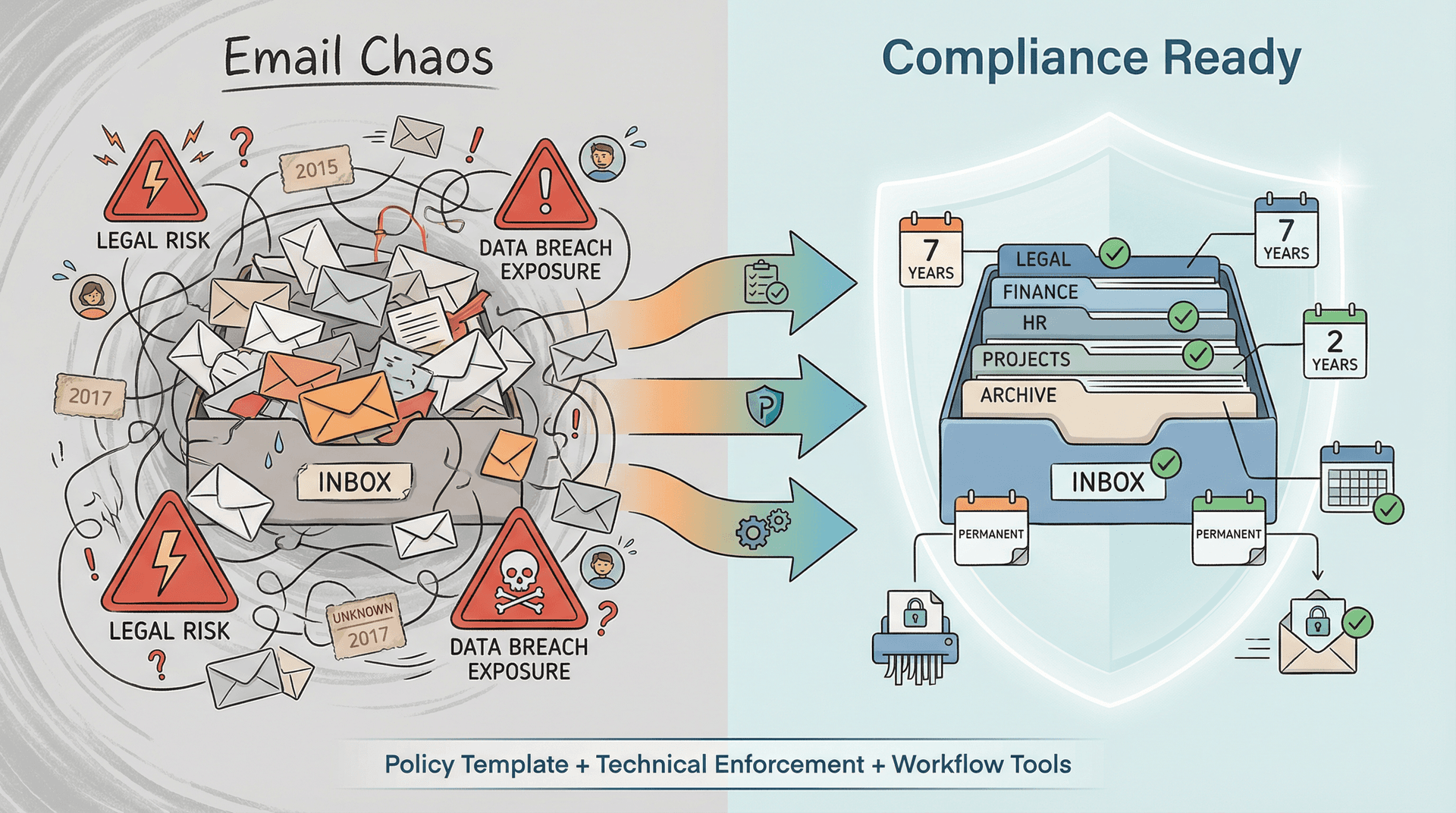
And if you want help putting the workflow layer in place (classification, routing, cleanup), Inbox Zero can handle that while your retention systems handle enforcement. Our approach to mastering email productivity works seamlessly with compliance requirements.
Questions? Get in touch with us to learn how we help enterprises manage email at scale. Whether you're a small business, founder, or large enterprise, we have solutions tailored to your retention and compliance needs.
What is the Inbox Zero Method & How do I Master It?
Discover the Inbox Zero method and learn simple steps to take control of your email inbox, stay organized, and boost productivity.

4 Email Productivity Hacks from Tim Ferriss, Andrew Huberman, and Sam Harris
Explore 4 powerful email productivity hacks from tech and wellness experts like Tim Ferriss and Andrew Huberman. Learn to create focus, optimize processing, manage time wisely, and delegate effectively to conquer your inbox.
Best Time to Send Emails for Response (2026)
Stop guessing when to send emails. Get data-backed timing strategies from 2026 research that improve response rates across all scenarios.
How To Organize Outlook Inbox? (2026 Guide)
Learn how to organize Outlook inbox with rules, folders, categories, and AI automation. Step-by-step guide for 2026 that actually works.