SOX Email Audit Trail Requirements: Complete Guide (2026)
SOX email audit trail requirements: 7-year retention, evidence formats, M365 Purview and Google Vault configs, plus the log expiration trap.

If you're searching for "email audit trail requirements for SOX compliance," you're probably facing one of these challenges right now. Maybe you need to pass a SOX audit without getting destroyed on "insufficient evidence," especially for manual approvals that happened over email — journal entries, vendor bank changes, revenue exceptions, close sign-offs. Or maybe you're trying to stop "we approved it in an email somewhere" from being your actual control, because that's brittle, impossible to retrieve quickly, and easy to dispute when auditors come asking. Or perhaps you need to set up retention and logging so your evidence can't quietly disappear, including the emails themselves and the admin/user activity logs around them.
Success looks like this: you can pull any SOX sample in minutes (not days), the evidence is complete (what/why/who/when), it's defensible (integrity plus retention plus access controls), and you can explain your entire design in one diagram and one control narrative.
Let's build that system.
What Does SOX Say About Email Audit Trails?
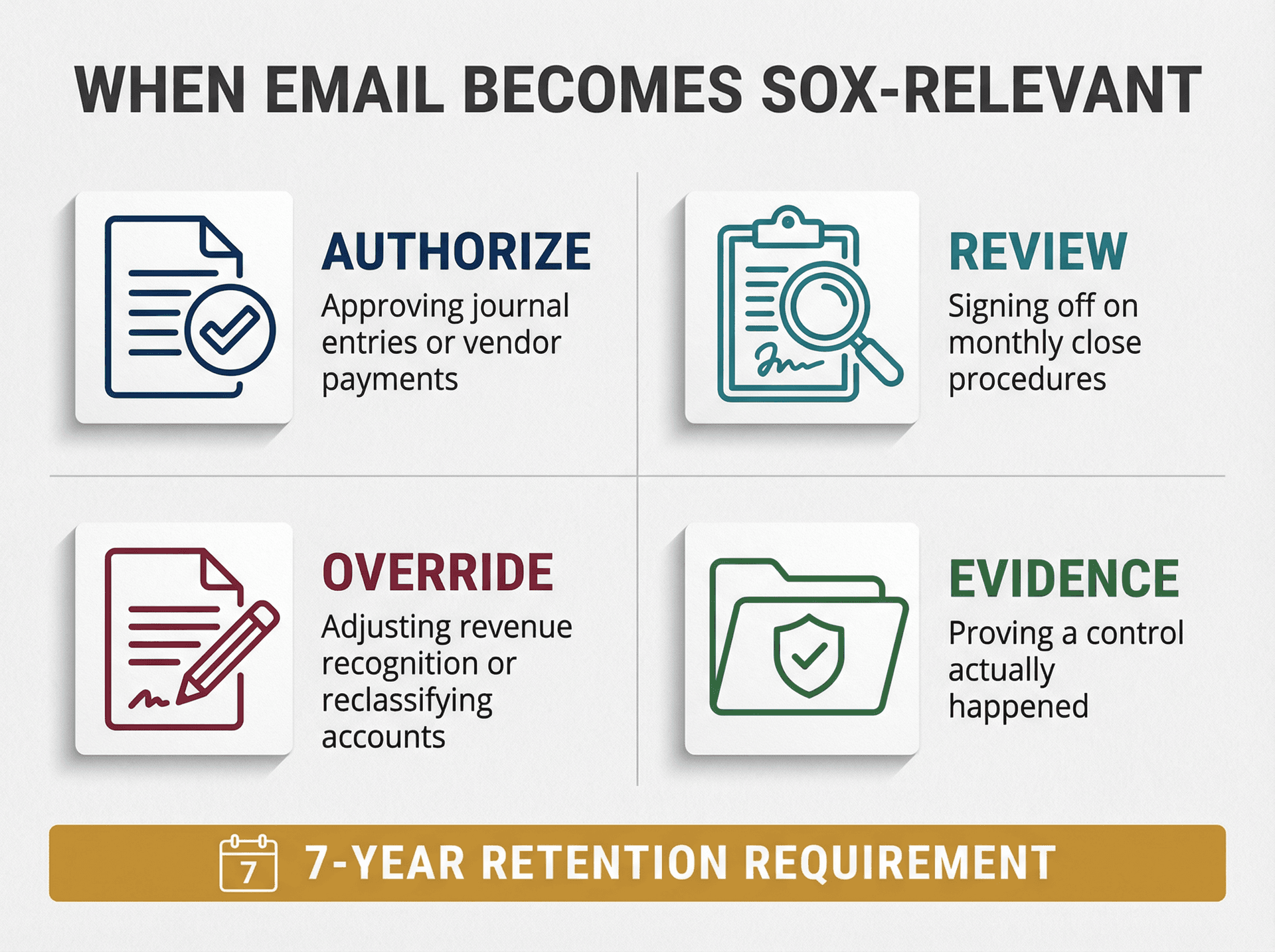
Here's what people miss: SOX is about internal control over financial reporting (ICFR). Email matters only when it becomes part of that control framework. Specifically, email becomes SOX-relevant when you use it to authorize something financial (approving a journal entry or vendor payment), review something financial (signing off on monthly close procedures), override or change something that affects reporting (adjusting revenue recognition or reclassifying accounts), or evidence that a control actually happened (proving the CFO reviewed something before it posted).
Here's the regulatory context that sets the tone: the SOX Act explicitly directs that auditors must retain audit documentation and workpapers for not less than 7 years. That's about registered public accounting firms, but it establishes the standard for "records must exist and be supportable."
The SEC followed through by adopting rules requiring accountants to retain audit documentation for 7 years (adopted January 22, 2003).
The practical takeaway is that SOX doesn't mandate your exact email system or retention tool. It mandates that your controls are real, repeatable, evidenced, and retained long enough to support financial statements and audits.
What Must a SOX-Compliant Email Audit Trail Prove?
Think of a SOX audit trail as "can we reconstruct reality?"
For email-based approvals or reviews, you need to answer these questions quickly and defensively:
| Requirement | What You Must Prove | How to Prove It |
|---|---|---|
| Who Did It (Identity) | The approver or reviewer is uniquely identifiable | • Corporate-controlled mailbox (not personal Gmail)<br>• Delegation/shared access tightly controlled and logged<br>• Can prove it was actually that person (not someone using their credentials) |
| What They Approved (Content) | The exact transaction or report being approved | • Exact transaction or report (ID, period, amount, vendor/customer)<br>• Specific version reviewed (attachment, report snapshot, or immutable link)<br>• Clear linkage prevents "can't remember what I approved" |
| When It Happened (Timestamp) | Date and time of approval/review | • Capture date and time of approval<br>• Show sequence if timing matters for control (close cutoff, pre-posting vs. post-posting) |
| Integrity (Tamper Resistance) | Email can't be silently deleted or altered | • Retention policies or litigation holds prevent "oops, it's gone"<br>• Admin changes to retention/access are logged and monitored |
| Retention & Retrieval | You can search, export, and retain long enough | • Search and export emails for audits and legal matters<br>• Retain long enough for policy plus audit cycle<br>• Retrieve logs long enough (the trap everyone falls into) |
Email Retention vs Log Retention: Critical Difference
Here's the distinction that trips up even experienced compliance teams:
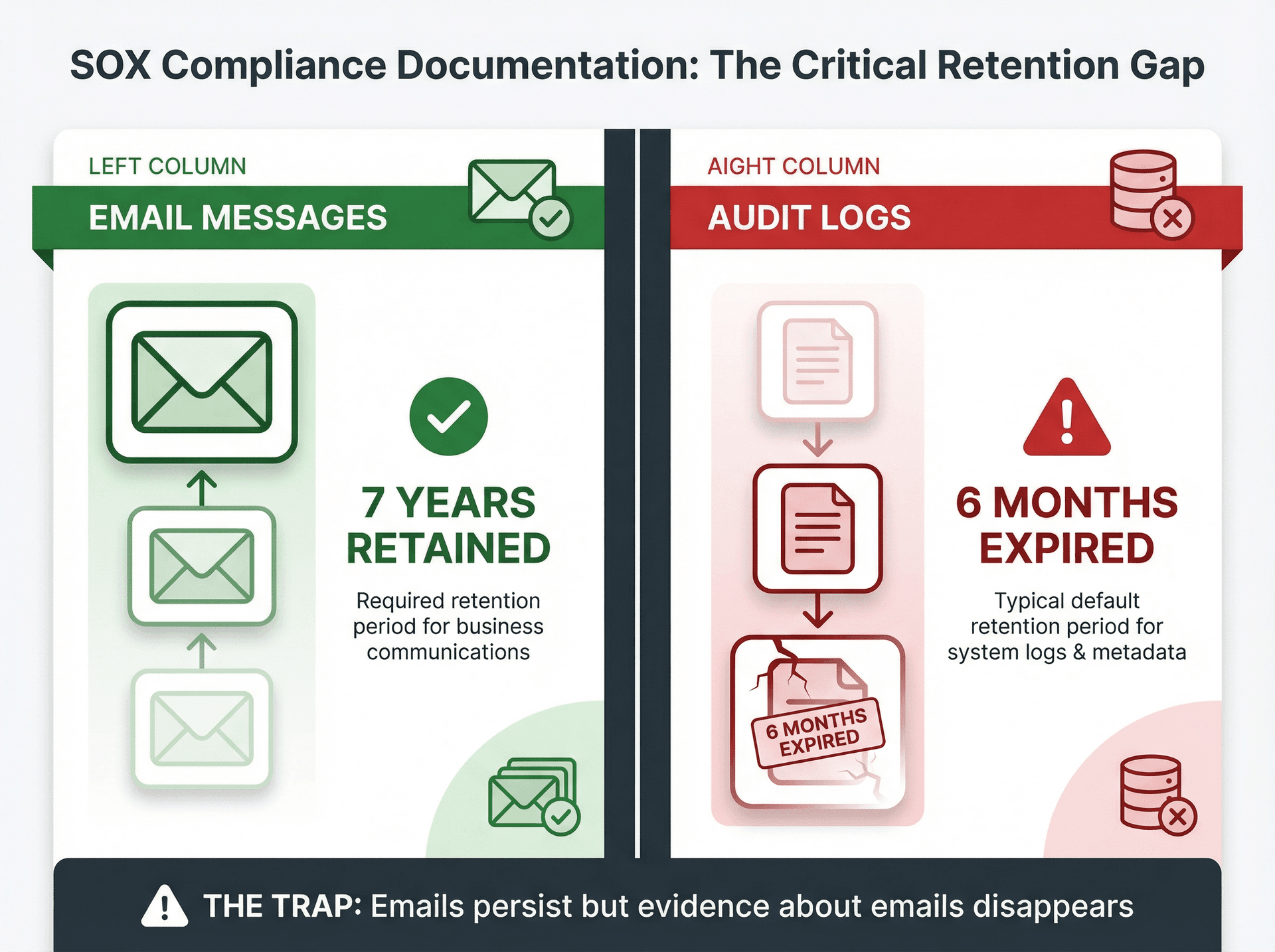
The trap: You need to retain BOTH the emails (business record) AND the evidence about the emails (audit trail). Your email platform probably retains the emails for years but expires the logs in months. When an investigation or audit reaches back a year, you're blind.
How to Retain Email Messages (Business Records)
This is what most people think of: keeping the actual email messages with their attachments. You handle this through retention policies, litigation holds, and archive solutions. These are the mechanisms that keep the content itself safe from deletion — whether by accident, policy, or malicious intent.
How to Retain Email Activity Logs (Audit Trail)
This is the metadata and activity logs that prove who did what with the emails. You handle this through admin audit logs (policy changes, role changes, retention changes), mailbox and user activity logs (access, send-as delegation, forwarding rules), and eDiscovery exports with chain-of-custody artifacts. The critical thing to understand is that these logs often have much shorter default retention windows than the emails themselves — and that gap is where compliance programs break down.
What Auditors Need: Email Approval Format Checklist
If you're using email as control evidence, you need a standard format and you need to enforce it. Email management strategies that include proper documentation and organization are essential for compliance.
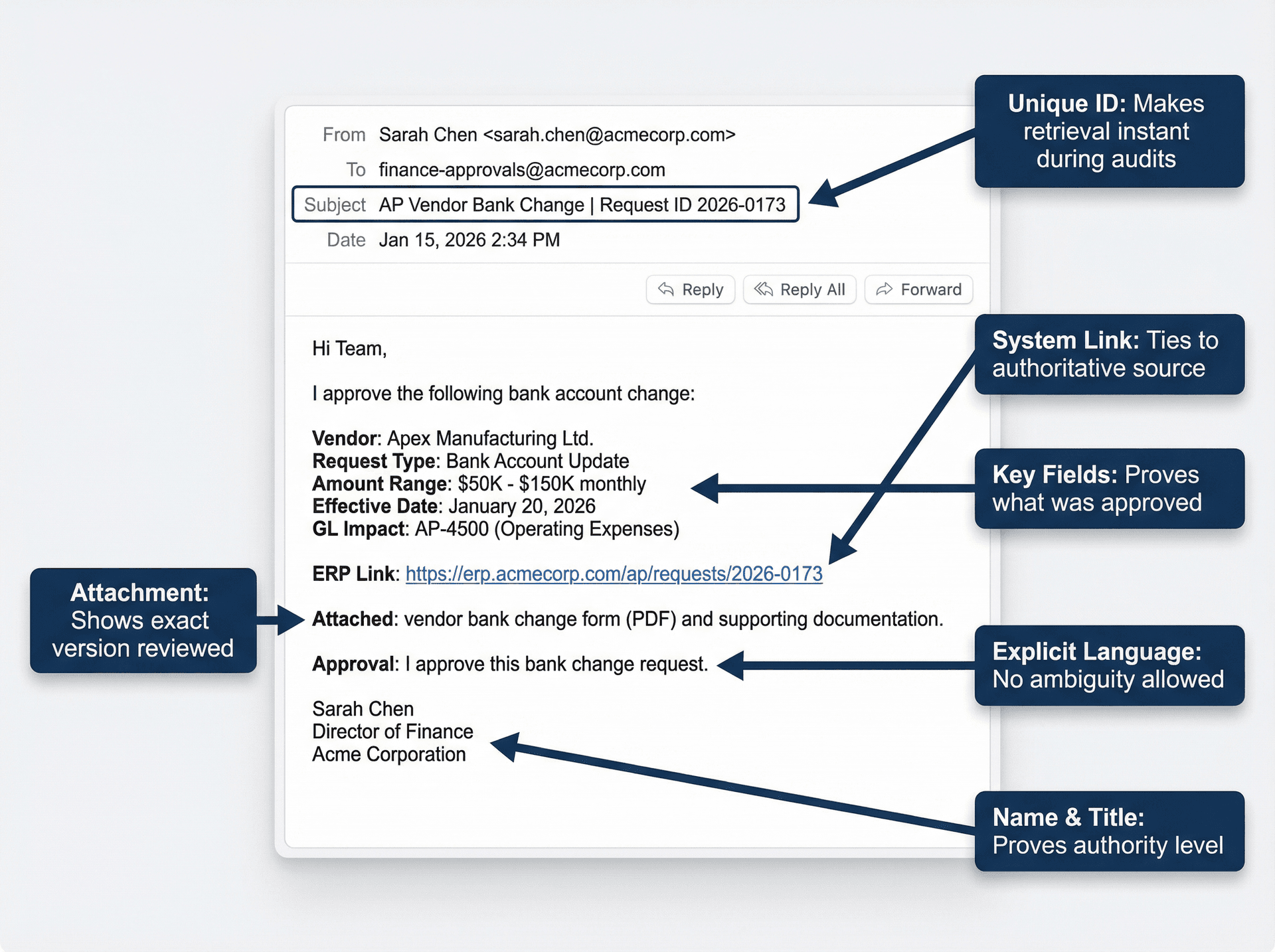
A SOX-usable approval email should include the following elements:
| Element | Example | Why It Matters |
|---|---|---|
| Unique ID in subject | AP Vendor Bank Change | Request ID 2026-0173 | Makes retrieval instant |
| System-of-record link | Link to ERP ticket or workflow item | Ties email to authoritative source |
| Key fields in body | Amount, vendor, effective date, GL impact | Proves what was approved |
| Explicit approval language | "I approve this bank change" (not "sounds good") | Removes ambiguity |
| Approver's name and title | Signature block with role | Proves authority level |
| Attachment or immutable link | PDF snapshot or locked report URL | Shows exact version reviewed |
Operationally, the email must also be sent from the approver's corporate mailbox (not personal email), it must be covered by a retention policy or litigation hold, and you must be able to produce the full thread plus attachments on demand.
How Long to Retain SOX Email Evidence
What You Can Say with High Confidence
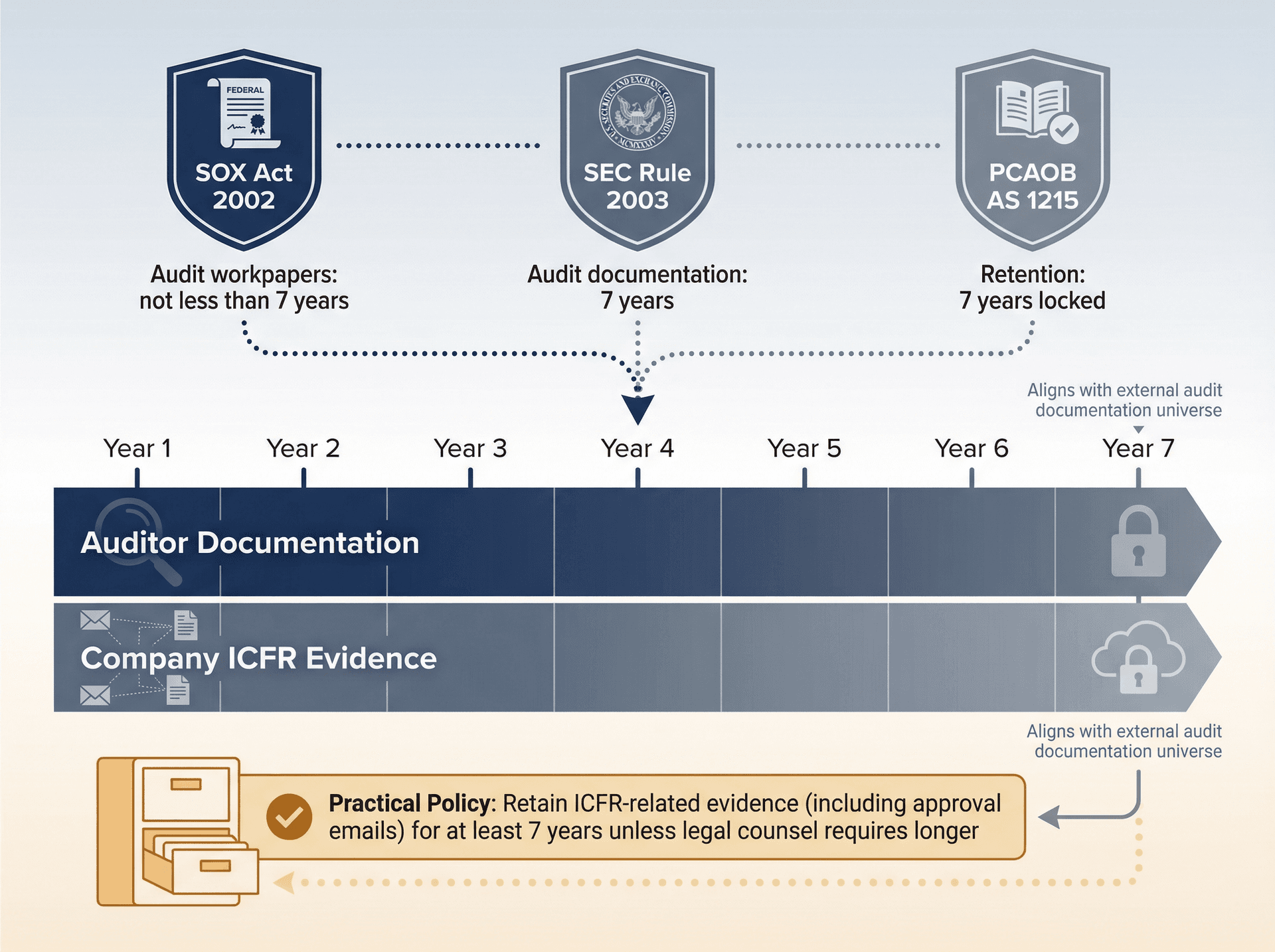
Auditors (public accounting firms) have explicit 7-year retention expectations for audit documentation and workpapers. This appears in multiple places. The SOX Act itself calls for "not less than 7 years" for audit workpapers.
The SEC's audit documentation retention rule is 7 years (adopted January 22, 2003).
And PCAOB Auditing Standard AS 1215 requires 7-year retention, with explicit requirements about locking documentation after a "documentation completion date" (tightened to 14 days in the current standard).
What You Should NOT Claim as a Universal Rule
Don't say: "SOX requires all company emails be retained for 7 years." That's not a clean, universal statement. Your company sets record retention based on business, legal, tax, and regulatory needs. SOX is the forcing function because ICFR evidence must exist when auditors need it.
Practical Policy Recommendation (Common and Defensible)
Most SOX programs choose to retain ICFR-related evidence (including approval emails) for at least 7 years unless legal counsel requires longer. The reason 7 years has become the standard is that it aligns with the external audit documentation universe and reduces the risk of "we can't support prior period" findings. Cite this rationale in your retention schedule rather than pretending it's a single-line SOX mandate.
How to Set Up SOX Email Retention in Microsoft 365
Step 1: Configure Purview Retention for Email Content
Microsoft's guidance is straightforward: retention policies and labels can retain mail messages (including drafts, sent items, and attachments).
You need to implement a baseline retention policy for Exchange mailboxes (example: "Retain ICFR mail 7 years"), along with targeted retention labels for SOX evidence folders if you do item-level classification. Add litigation holds or eDiscovery holds for investigations and legal matters. The key audit point is that you want to be able to say, "Even if a user deletes the email, our retention policy or hold preserves it." Microsoft documents how holds and retention work together.
Step 2: Configure Audit Log Retention (Critical Step)
This is where teams get surprised. Purview audit retains audit data for 180 days by default when auditing is turned on. But you can create audit log retention policies (part of Audit Premium) to retain logs longer, up to 10 years depending on licensing and add-ons.
To handle this correctly, decide your required audit-log retention period (many SOX programs want at least 1 year; some want multiple years). If you're relying on Purview audit for investigations or SOX evidence, budget for the right license tier and configure retention policies accordingly.
Step 3: Lock Down Admin Access and Prove It
SOX auditors will ask who can change retention policies, who can grant mailbox access or send-as permissions, and whether there's segregation of duties between admins and business users.
Make sure that role assignments follow least-privilege principles, that admin activity is logged and retained (see audit retention above), and that changes to retention or holds go through change management and approvals.
How to Set Up SOX Email Retention in Google Workspace
Google is excellent for keeping mail. The trap is logs.
Step 1: Configure Google Vault for Email Retention
Vault is the native tool for retention, holds, and eDiscovery in Workspace. Google documents Vault as part of the compliance stack, and vault log events are listed as "indefinite" in the Workspace data retention page. You should implement Vault retention rules aligned to your record retention schedule, set up holds for investigations and legal matters, and establish eDiscovery procedures for exporting with metadata and chain-of-custody.
Step 2: Understand Google Workspace Log Retention Limits
Google's admin help page lays out default retention windows for Workspace logs:
| Log Type | Default Retention |
|---|---|
| Gmail log events | 6 months |
| Admin log events | 6 months |
| Email log search | 30 days |
| Most other logs | 6 months |
The problem is straightforward: if your audit trail depends on Workspace logs and you don't export them, your evidence evaporates after these windows.
Step 3: Export Workspace Logs to Google Cloud for Long-Term Storage
Google Cloud's documentation explains that you can share Google Workspace audit logs with Google Cloud and route them to destinations like BigQuery, Cloud Storage, or Pub/Sub. It also explains the retention model when stored in Cloud Logging: the _default bucket retention can be configured up to 3,650 days (10 years), while the _required bucket retention is fixed and not configurable.
To implement this, enable Workspace data sharing with Google Cloud, route relevant logs to a dedicated logging bucket and/or BigQuery, and set retention to match your SOX and security needs (often multiple years). Document the pipeline as a control: "Logs are exported daily; retention set to X years; access restricted; alerts on failures."
When Email Approvals Work for SOX (And When They Don't)
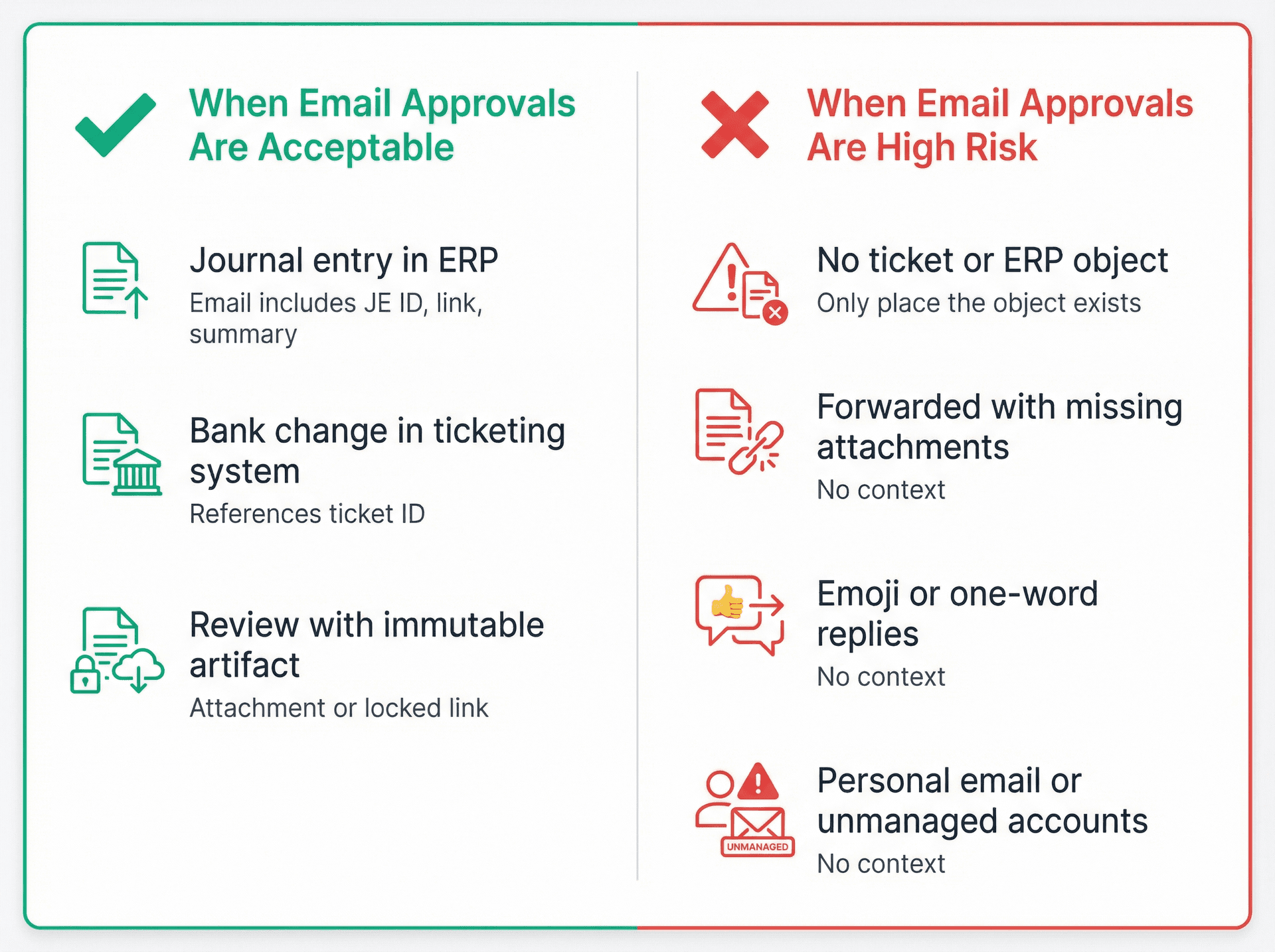
When Email Approvals Are Acceptable
Email is acceptable as evidence when it's basically a signature on a clearly identified object. For example, approving a journal entry that already exists in the ERP (where the email includes the JE ID, link, and summary), approving a bank change request tracked in a ticketing or workflow tool (where the email references the ticket ID), or a review sign-off where the reviewed artifact is attached or immutably linked.
When Email Approvals Are High Risk
Email is risky when it's the only place the "object" exists. Situations to avoid include "Please book this entry" with no ticket or ERP object followed by "approved," approvals done over forwarded emails with missing attachments, approvals via emoji or one-word replies with no context, and approvals from personal email or unmanaged devices and accounts.
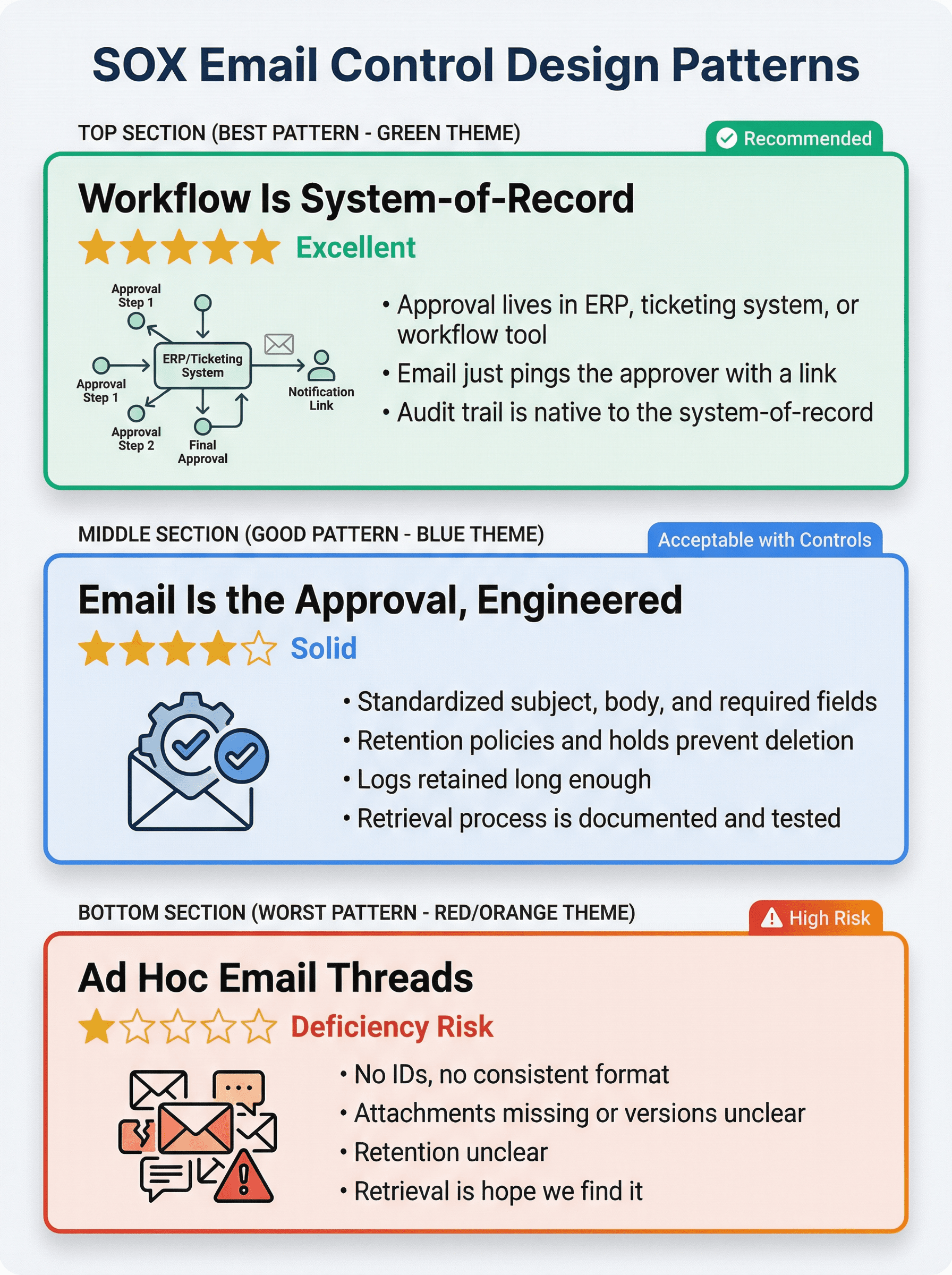
SOX Email Control Design Patterns That Work
Use this as your north star when designing email-based controls. Understanding how to manage your inbox effectively can improve your control framework.
| Pattern | Description | Audit Trail Quality |
|---|---|---|
| Best: Workflow Is System-of-Record | • Approval lives in ERP, ticketing system, or workflow tool<br>• Email just pings the approver with a link<br>• Audit trail is native to the system-of-record | ★★★★★ Excellent |
| Good: Email Is the Approval, Engineered | • Standardized subject, body, and required fields<br>• Retention policies and holds prevent deletion<br>• Logs retained long enough<br>• Retrieval process is documented and tested | ★★★★☆ Solid |
| Worst: Ad Hoc Email Threads | • No IDs, no consistent format<br>• Attachments missing or versions unclear<br>• Retention unclear<br>• Retrieval is "hope we find it" | ★☆☆☆☆ Deficiency Risk |
What Evidence to Give SOX Auditors
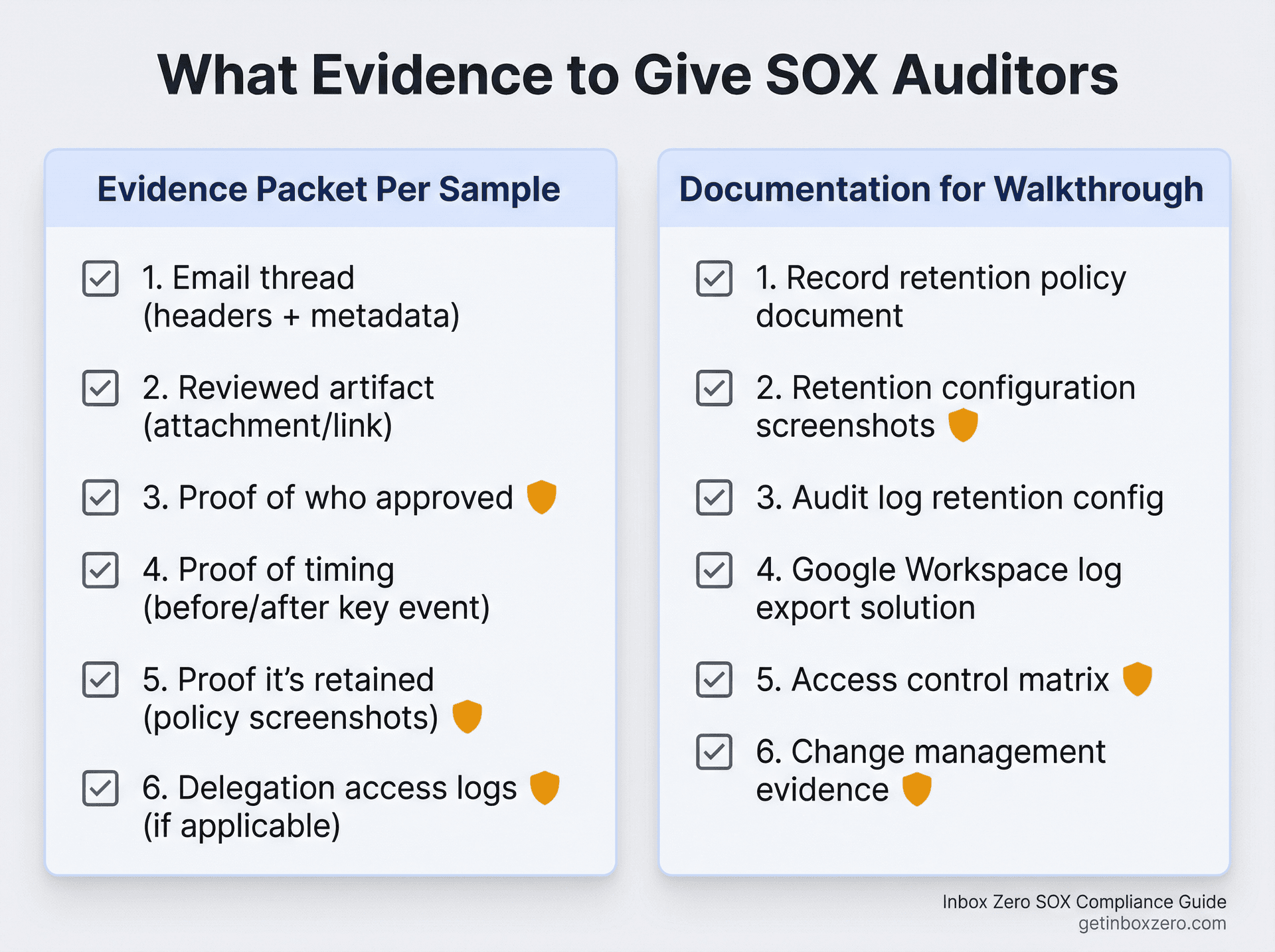
Typical SOX Testing Request
"Provide evidence that Control X operated for samples A through N."
If your control uses email, your evidence packet per sample should include the email thread (including headers and metadata if possible), the reviewed artifact (attachment or immutable link), proof of who approved (identity verification), proof it happened before or after the key event as required (timing), proof it's retained (retention policy or hold screenshots, or admin export notes), and — if there's delegation or shared mailbox usage — proof that access is controlled and logged.
For complex email environments, learning email inbox management best practices can streamline this evidence collection process.
Documentation to Prepare for Walkthrough
Have this ready for your auditors: a record retention policy document (what gets retained, how long, and why), retention configuration screenshots from Purview policies or Vault rules, audit log retention configuration plus licensing notes for Purview, your Google Workspace log retention reality plus your export solution details, an access control matrix for compliance tools (who can search and export), and change management evidence for retention policy changes.
Why Email Audit Logs Expire Too Fast (Critical Gap)
Here's the blunt version: In Google Workspace, many logs are 6 months and email log search is 30 days unless you export them. In Microsoft Purview audit, default retention is 180 days unless you configure audit retention policies and licensing. So if you get investigated or audited a year later and you're relying on default logs, you're blind.
This is the single biggest gap we see in SOX email programs. Teams configure email retention perfectly and then discover they can't prove who did what because the logs expired.
Why SEC Recordkeeping Enforcement Matters for Your SOX Program
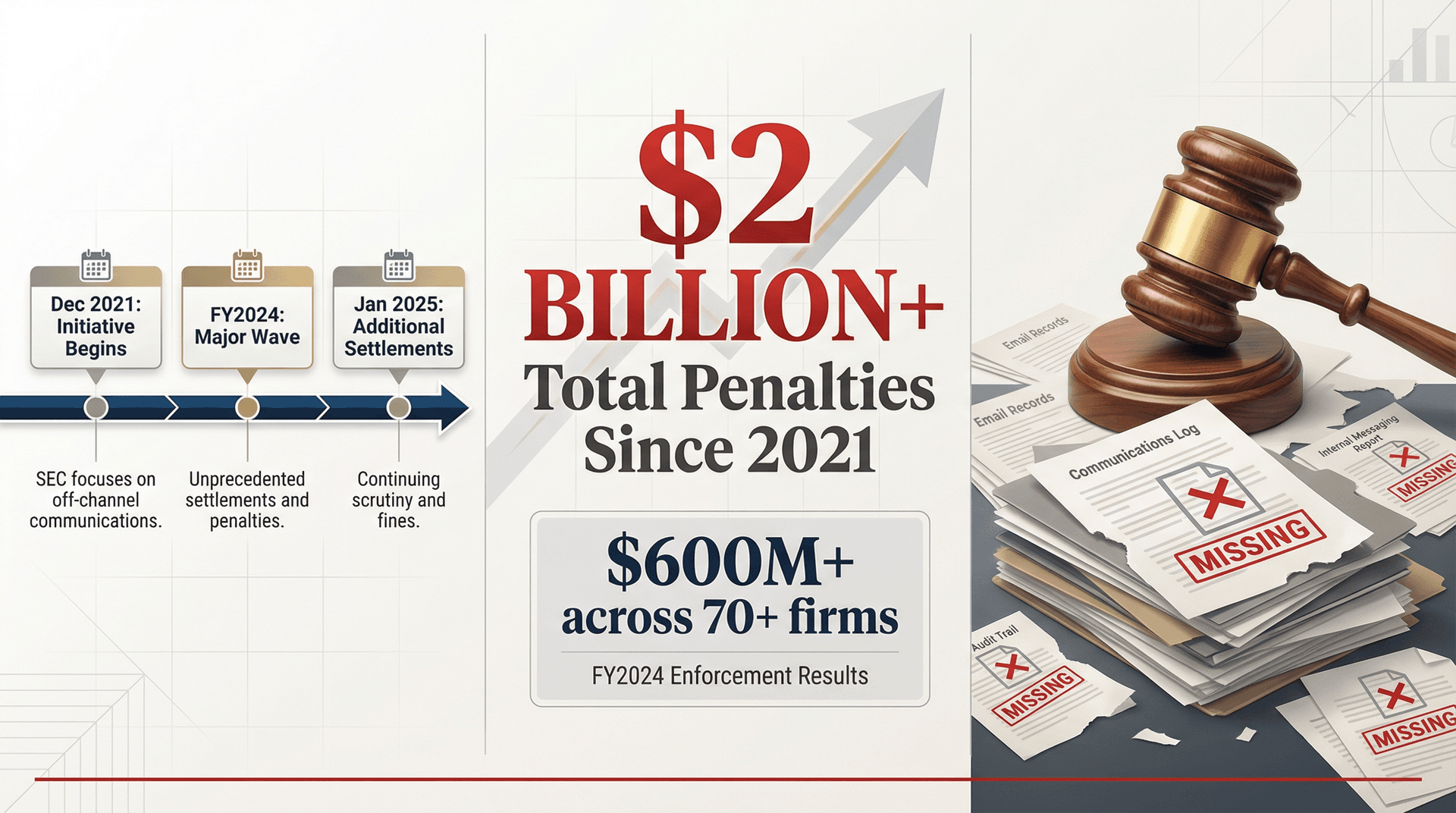
Even if you're "just" a public company (not a broker-dealer), the enforcement direction is clear: regulators hate missing communications records.
The SEC's FY2024 enforcement results explicitly call out recordkeeping cases with more than $600 million in penalties across 70+ firms, and the initiative has produced $2 billion+ in penalties since December 2021. In January 2025, the SEC announced additional settlements over off-channel communications recordkeeping failures.
While "SOX email audit trail" isn't the same as broker-dealer recordkeeping under Rule 17a-4, the lesson transfers: if you can't produce communications records when regulators come asking, they assume the worst.
How to Use Inbox Zero for SOX Compliance
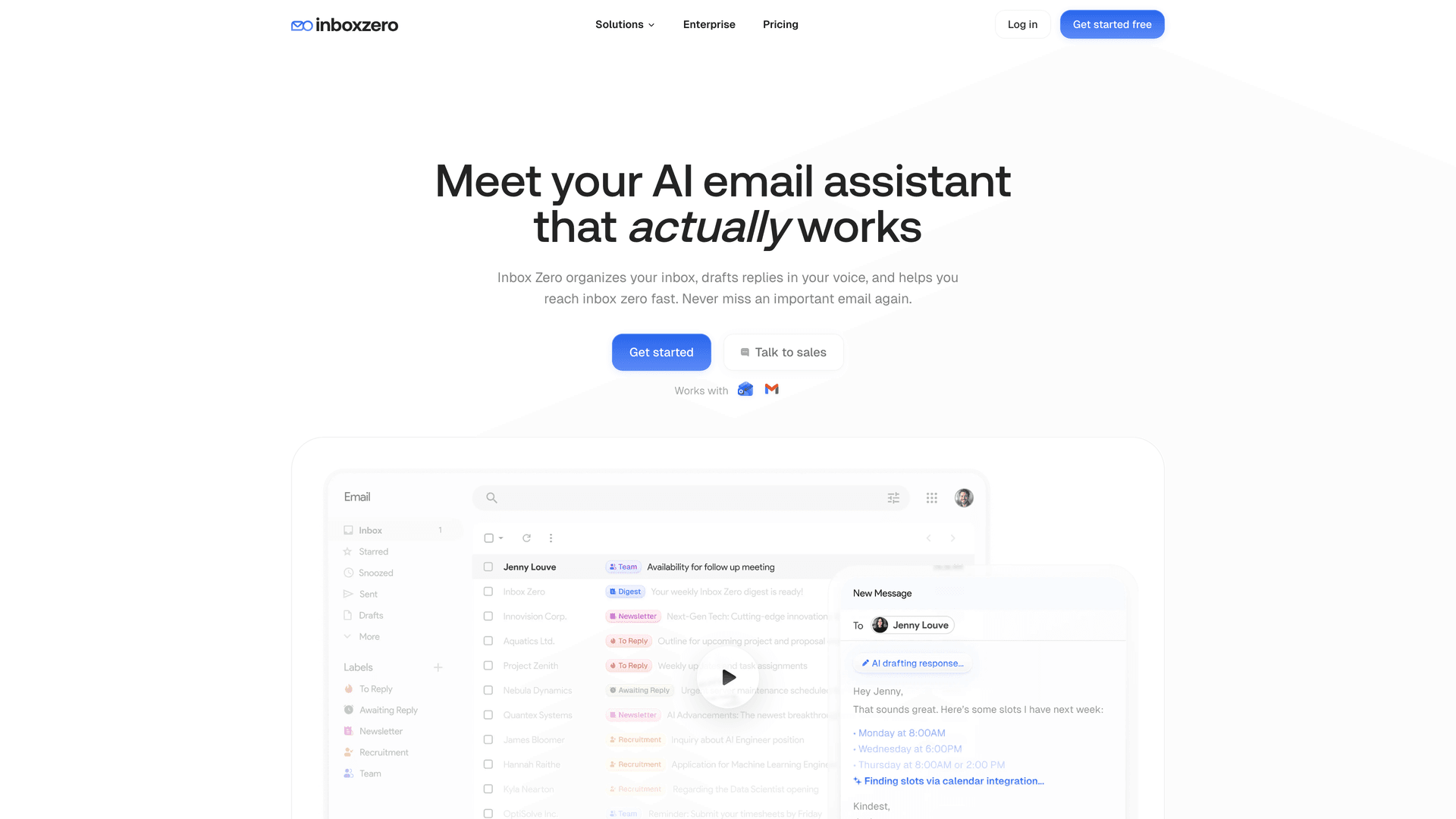
SOX teams usually fear "AI automations" because they imagine auto-sending emails and uncontrolled changes to financial records. Inbox Zero's product design is actually compatible with a conservative SOX posture if you configure it correctly. For organizations looking for SOC 2 compliant email tools, Inbox Zero offers the necessary security certifications and audit trails.
Here's how we approach it:
Keep Humans in Control for Financial Controls
Inbox Zero supports rule-driven actions like labeling, archiving, drafting replies, and more. You can build rules with static conditions (deterministic) or AI conditions (judgment-based). Our AI automation features are designed to enhance human decision-making, not replace it.
For SOX-sensitive mail, use draft email mode (human approval required) instead of auto-send, and use labels to create an evidence-ready mailbox view (like "SOX: Approvals" or "SOX: Bank Changes"). This keeps automation helpful without removing human oversight. Understanding AI email management principles can help you deploy AI safely in compliance-sensitive environments.
Create Audit-Friendly Evidence Trails
You can use the "call webhook" action to push structured metadata (message ID, thread ID, rule ID, why it fired, timestamp) into your ticketing system or evidence repository. The webhook payload includes thread and message IDs plus rule execution metadata. That's powerful because it creates a second system-of-record trail without moving email out of Gmail or Outlook — your audit evidence lives in both places.
Treat Inbox Zero Rules Like SOX Controls
Treat Inbox Zero rules like code. Require approvals for rule changes (change management), maintain version history and change logs, restrict admin access so only authorized users can edit rules, and test before enabling automation (we have "test rules" and "fix rules" features built in).
How to Address Vendor Risk Questions
If your procurement or compliance team asks about vendor risk, you'll want to understand whether it's safe to connect third-party apps to Gmail. Our security posture is transparent: our trust center lists SOC 2 Type 2 as compliant.
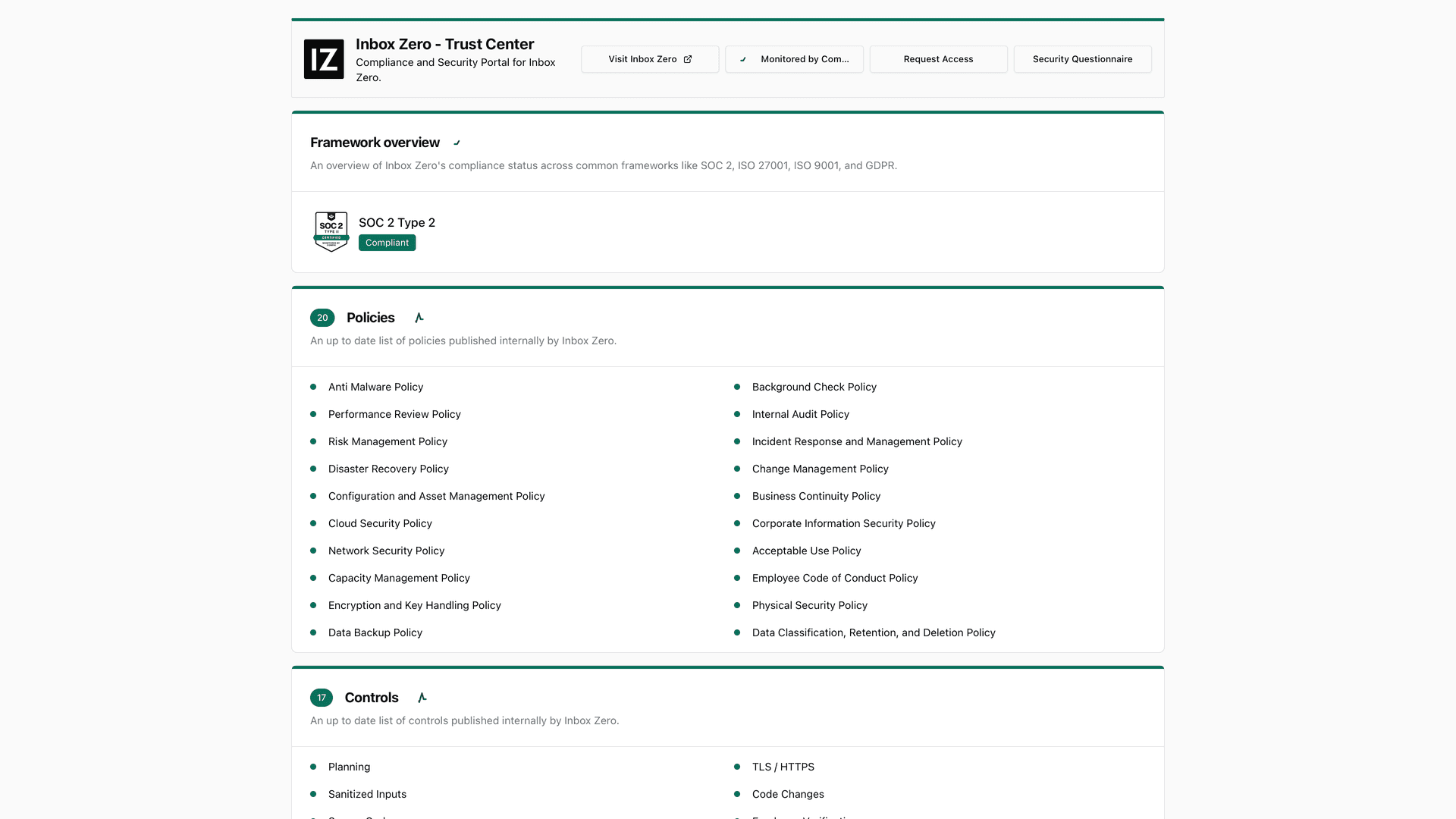
Our enterprise page states we're Google-verified via third-party auditor and CASA Tier 2, plus SOC 2 Type 2.
If you're self-hosting Inbox Zero (we're open source), you'll still need your own controls around infrastructure, access, and logging. Check our documentation for self-hosting guidance and security best practices.
How the Gmail Extension Helps (Without Being a Control)
Inbox Zero Tabs for Gmail can help humans find evidence faster by adding custom tabs based on Gmail queries. Learn more about the extension features and how they integrate with your existing workflow. It's listed as no data collection and uses local settings only, showing version and update date on the Chrome Web Store.
That said, it doesn't replace Vault or Purview retention or audit logging. It's a UX layer that makes your life easier, not a compliance control.
Implementation Checklist: Set Up SOX Email Audit Trail
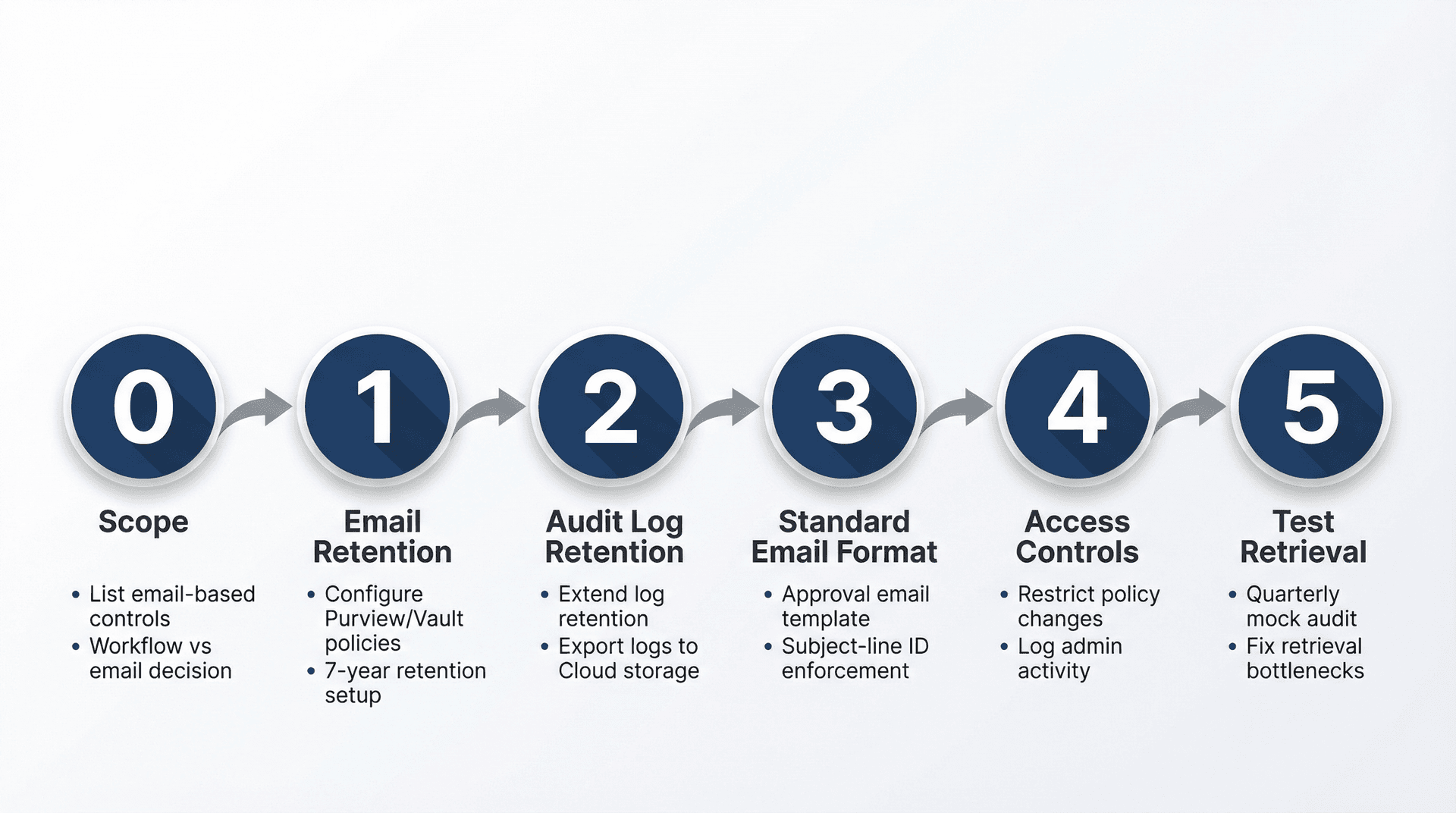
Phase 0: Scope
Start by listing the controls where email is used as evidence. Then decide which ones must move to a workflow tool versus which can be standardized in email.
Phase 1: Email Retention
For Microsoft environments, configure Purview retention for Exchange mailboxes using policies and labels. For Google environments, configure Vault retention rules and holds, document Vault as your eDiscovery tool, and note that vault logs are "indefinite". Implementing effective email management services alongside retention policies can improve compliance outcomes.
Phase 2: Audit Log Retention
On the Microsoft side, confirm Purview audit retention (default 180 days) and implement audit retention policies if needed. On the Google side, accept the 6-month log limits and export to Google Cloud logging or BigQuery for longer retention.
Phase 3: Standard Email Format
Create a standard approval email template with subject-line IDs (like "AP Vendor Bank Change | Request ID 2026-0173") and require an attachment or immutable link to what was reviewed. Consider using email management software that supports templating and standardization for consistent evidence formatting.
Phase 4: Access Controls
Restrict who can change retention policies, run eDiscovery exports, and grant mailbox delegation or send-as permissions. Log and review admin changes periodically. For team environments, explore shared inbox management best practices to maintain proper access controls.
Phase 5: Test Your Retrieval Process
Run a quarterly "mock audit pull," time how long it takes to produce a sample set, and fix what's slow or missing. Using email analytics can help you identify bottlenecks in your retrieval process and optimize your evidence collection procedures.
FAQ: SOX Email Audit Trail Requirements
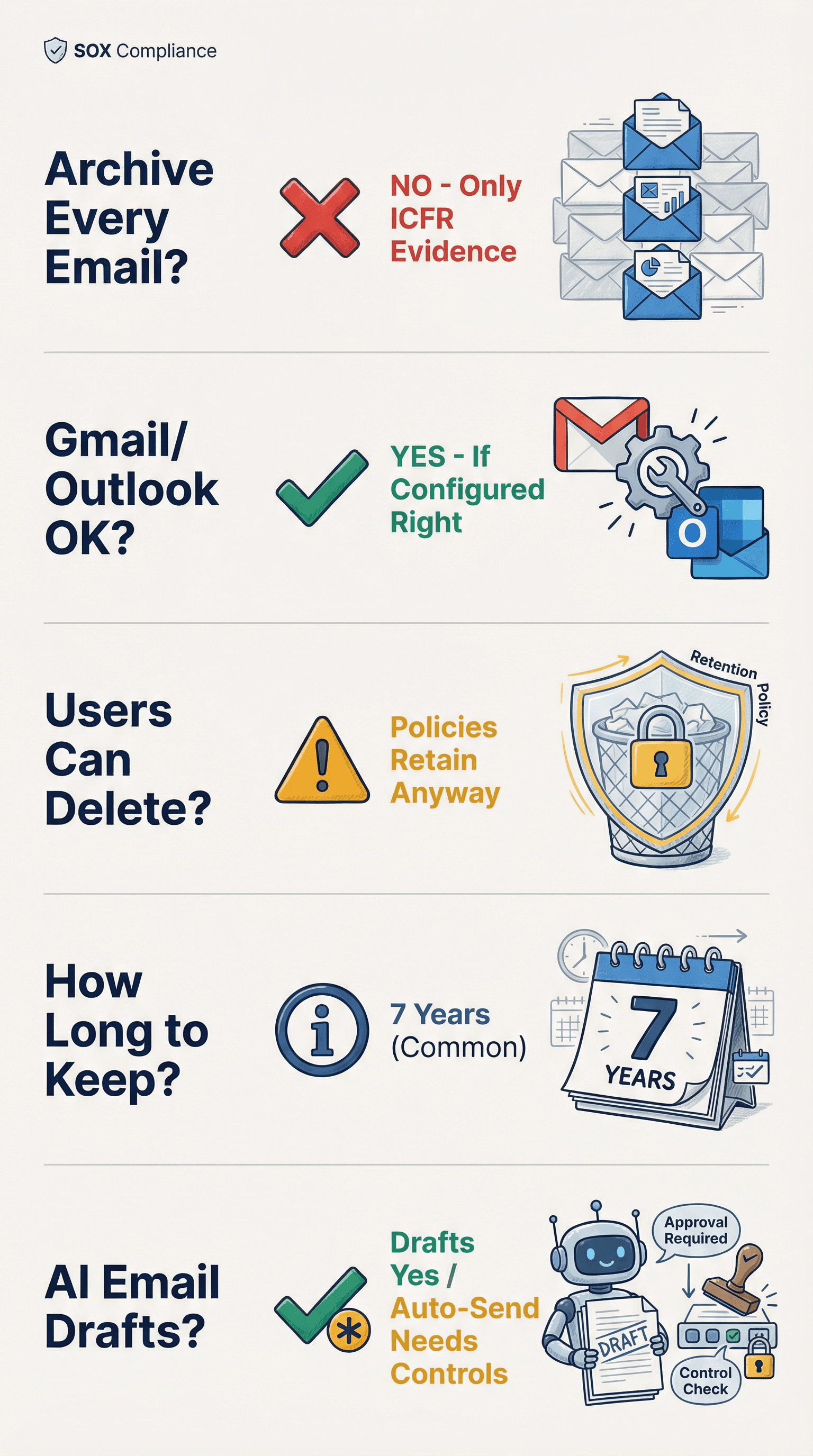
Do We Need to Archive Every Email for SOX?
No. You need to retain records that matter — ICFR evidence, financial approvals, audit-related communications — per your retention schedule. The mistake is thinking "email" is the unit. The unit is the business record and control evidence.
Is Gmail or Outlook Acceptable for SOX?
Yes, if configured with real retention, eDiscovery capabilities, audit logs, and retrieval procedures. The platform is fine. The configuration and discipline usually aren't.
Can Users Delete Emails If We Have Retention Policies?
Retention policies are designed to retain content even if users delete it (that's the whole point). But if retention is misconfigured or admins can override it without controls, you still have risk. Microsoft's retention and hold docs describe how holds and retention interact.
What's a Safe Baseline Retention Period?
Many SOX programs choose 7 years for ICFR evidence because it aligns with the audit documentation universe (SOX Act, SEC, and PCAOB rules). But your legal counsel may set longer or shorter periods depending on jurisdiction and record type.
Are AI-Drafted Emails Okay for SOX?
Drafting is usually fine. Auto-sending in an ICFR context is where you need tighter controls, testing, approvals, and monitoring. Treat it like any other automation that could affect financial reporting. Our guide to email management tips covers best practices for maintaining compliance while using AI assistance.
Summary: Building a Defensible SOX Email Audit Trail
A SOX-grade email audit trail is not "save emails."
It's structured evidence (what was approved or reviewed, with IDs and links), retention you can prove (emails plus attachments, with policies that survive user deletions), logs you can keep long enough (admin and user activity, exported if needed), and retrieval you've tested (not theoretical; you've actually run mock pulls).
Do that, and email stops being a compliance liability. It becomes a defensible record that supports your controls instead of undermining them.
And if you want help automating the routing and labeling side without breaking your SOX posture, that's exactly what we built Inbox Zero to do. Explore our clean inbox features to see how automation can support your compliance framework. Visit our homepage to learn more about how Inbox Zero can help you maintain audit-ready email management while improving productivity.
What is the Inbox Zero Method & How do I Master It?
Discover the Inbox Zero method and learn simple steps to take control of your email inbox, stay organized, and boost productivity.

4 Email Productivity Hacks from Tim Ferriss, Andrew Huberman, and Sam Harris
Explore 4 powerful email productivity hacks from tech and wellness experts like Tim Ferriss and Andrew Huberman. Learn to create focus, optimize processing, manage time wisely, and delegate effectively to conquer your inbox.
Best Time to Send Emails for Response (2026)
Stop guessing when to send emails. Get data-backed timing strategies from 2026 research that improve response rates across all scenarios.
How To Organize Outlook Inbox? (2026 Guide)
Learn how to organize Outlook inbox with rules, folders, categories, and AI automation. Step-by-step guide for 2026 that actually works.